Application
Spring AI Playground is a tool-first Spring Boot application with several UI surfaces layered on top of a shared runtime. The primary packaged experience is a cross-platform desktop app; Docker and source execution are supported as alternative runtimes.
This page explains how the system is organized, how requests flow through it, and where to extend it. It is intended for contributors, integrators, and anyone evaluating how the product is built under the hood.
This page is the map; each of the other architecture documents drills into one layer of it:
- AI Agent Tool Safety - the sandbox that contains locally-authored JS tools
- Safe Tool Specification - the normative JSON document a tool is written as
- MCP Server Safety - the risk model for external servers and the tools re-exposed from them
- Human-in-the-Loop Approval - the per-call approval gate in front of tool execution
- OWASP MCP Top 10 - how those controls map to the OWASP catalog
- Agent Loop - the round governance wrapped around Spring AI's tool-calling loop
- Context Engineering - what enters the model's context on each chat turn
- AI Agent Observability - the trace pipeline behind the in-app dashboards
Overview
The whole product is one local desktop app built on the idea of "no pass, no run": a tool is authored, tested in a sandbox against its own values, and only then published to the built-in MCP server where an agent can call it. External MCP servers are reached two ways - Agentic Chat and the MCP Inspector connect to them directly, and selected upstream tools are also composed/proxied onto the built-in server so they reach every consumer (Chat, Inspector, external /mcp clients) wrapped and governed. Agentic Chat composes tools with RAG grounding, served by a local model by default.
flowchart TB
    AUTH["Authored tools<br/>Tool Studio → Local Pass"] -->|"publish"| BUILTIN["Built-in MCP server<br/>/mcp · governed hub"]
    EXT["External MCP servers"] -->|"compose / proxy"| BUILTIN

    BUILTIN --> CHAT["Agentic Chat"]
    BUILTIN --> INSP["MCP Server - Inspector"]
    BUILTIN --> EXTC["External /mcp clients"]

    EXT -.->|"direct"| CHAT
    EXT -.->|"direct"| INSP
Solid arrows are the built-in server path (authored tools + proxied external tools); dotted arrows are direct external connections. The rest of this page expands that flow into runtime layers, feature modules, and data flows.
Design Goals
Spring AI Playground is a Safe Local Execution Layer for AI Agent Tools. A tool a model can invoke is just code running on someone's machine - so the whole system is shaped to make that code declare what it touches before it touches anything. A tool is a structured spec; the spec runs in a Java-level sandbox on the author's own host; the sandbox earns the tool a Local Pass against the author's own test values; only then does the tool reach the built-in MCP server where any client (including the model) can call it. No pass, no run is the product, not a slogan.
That framing drives every other choice on this page:
- Tools are executable, not descriptive. Tool definitions run in a sandbox and can be tested before they are published.
- MCP is a first-class runtime boundary. Built-in and external tools are consumed through the same Model Context Protocol surface.
- RAG is inspectable. Retrieved chunks are visible in Chat before the model uses them.
- Chat composes capabilities. Agentic Chat is where tools and grounded context are combined - not where they are invented.
- Local-first defaults. No external database or cloud services required to try the product end-to-end.
Runtime Layers
The application is easiest to think about as five layers. Each layer has a well-defined responsibility and a narrow interface with the one above it.
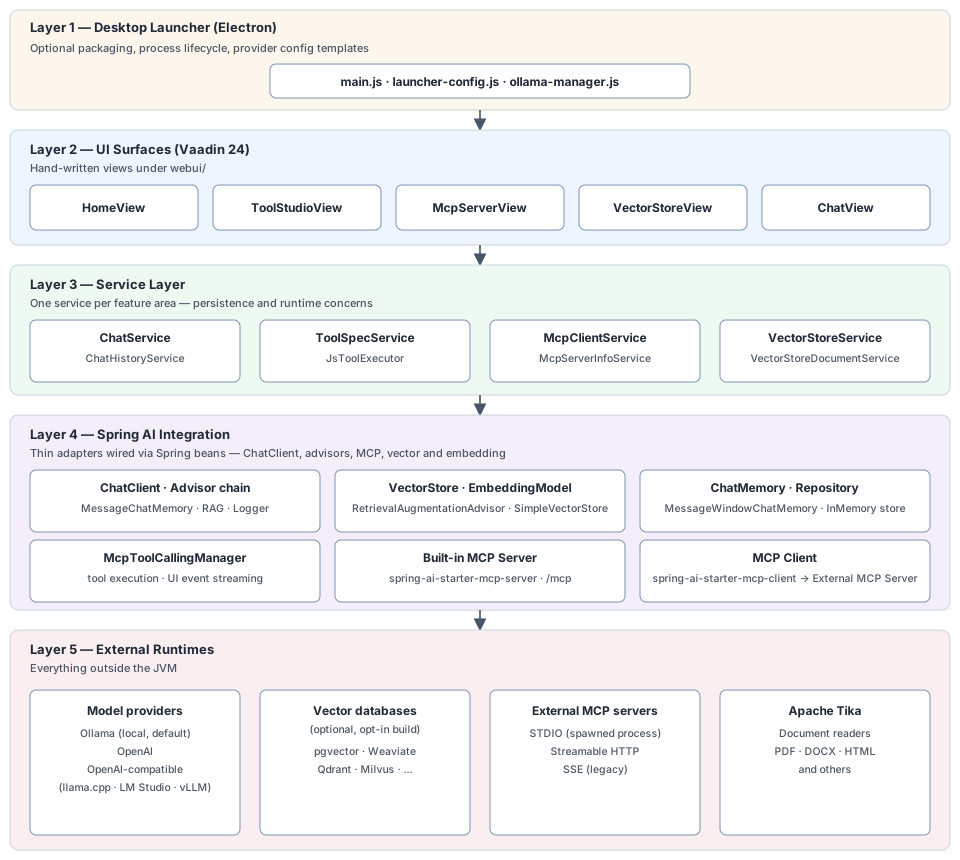
Layer 1 - Desktop Launcher (Electron)
Located in electron/. Responsible for packaging, configuration, and process lifecycle - not for any AI behavior.
main.jsspawns the bundled Spring Boot JAR, polls for readiness, opens the mainBrowserWindow, and terminates the JVM on quit.launcher-config.jsholds YAML templates per provider (Ollama, OpenAI, OpenAI-compatible).ollama-manager.jsdrives the Ollama model manager window.- OS secure storage - provider API keys and
${ENV}secrets entered in the launcher are sealed with ElectronsafeStorage(Keychain on macOS, DPAPI on Windows, libsecret/kwallet on Linux) and written to an encryptedsecretsstore, never as plaintext when OS encryption is available.
The launcher is optional. Running the JAR directly or the Docker image skips this layer entirely.
Layer 2 - UI Surfaces
Hand-written Vaadin Flow views under src/main/java/org/springaicommunity/playground/webui/. Not Hilla-generated. Each feature area has a root view (@Route, @SpringComponent, @UIScope) and smaller component views composed inside it.
| Package | Root view | Purpose |
|---|---|---|
webui/home |
HomeView |
Landing page with product surfaces |
webui/tool |
ToolStudioView |
JavaScript tool authoring and test runner |
webui/mcp |
McpServerView, McpServerConnectionView, McpServerConfigView |
Sidebar (Built-in / Active / Inactive catalog), connection form, Inspector for built-in and external MCP servers |
webui/vectorstore |
VectorStoreView |
Document upload, chunk inspection, search |
webui/chat |
ChatView |
Agentic Chat with tools and RAG |
webui/observability |
ObservabilityView |
Fourteen dashboards (Overview · Tokens & Cost · AI Models · Tool Studio · MCP Servers · MCP Inspector · Vector Database · Agentic Chat · Safety · Host · Ollama · Web Application · Logs · Traces) + Trace Detail / Conversation Thread / Model Pricing Manager dialogs |
webui/common/sidebar |
SidebarFilterBar, CategoryGroupDetails, SidebarItemLayout |
Shared widgets used by both the MCP Server sidebar and the Tool Studio tool list - search + Categories MultiSelect + Tags MultiSelect, collapsible per-category groups, status dot · name · pills row |
Streaming responses (chat, tool execution traces) are pushed to the browser over Vaadin's WebSocket push.
Layer 3 - Backend Services
Per-feature services under src/main/java/org/springaicommunity/playground/service/, each owning its persistence and runtime concerns. (The observability backend is a separate top-level observability/ package - its UI sits in Layer 2 and its pipeline is documented in AI Agent Observability.)
| Package | Key services | Owns |
|---|---|---|
service/chat |
ChatService, ChatHistoryService |
Chat execution, history, tool/RAG composition |
service/tool |
ToolSpecService, ToolCategoryCatalog, ChipListBinding, DefaultToolPresetCatalog, DefaultToolsPreference{Resolver,Service}, ToolActivationCalculator, McpToolDefinition + ToolManifest envelope |
Tool definitions, preset/preference resolution, draft/exposure state |
service/tool/runtime |
JsToolExecutor, JsRuntimeGlobals, SafeHttpFetch, SafeFs, JsHelperException |
GraalVM sandbox, fetch SSRF guard, safety.fs, safety.parser.* |
service/tool/policy |
EffectivePolicyResolver, SandboxPostureCalculator |
Per-tool capability overrides + sandbox risk-level (L0-L5) calculation (distinct from the MCP connection/exposure risk in service/mcp/risk) |
service/agent |
AgentLoopManager, AgentTurn, AgentLoopHarness, AgentRoundInterceptor (LoopGuard / HitlApproval / FileUpload / ImageReference), AgentTurnMessages |
The agent loop layer that wraps Spring AI's tool-calling loop: per-turn state, round bounds, and the chat-side interceptor chain (HITL approval, interactive upload/image, loop guards) - see Agent Loop |
service/mcp |
McpServerInfoService, McpServerHitlToolGate |
Built-in MCP server metadata and the server-side human-in-the-loop elicitation gate - see Human-in-the-Loop Approval |
service/oauth |
EncryptedFileOAuth2AuthorizedClientRepository, OAuthTokenEncryptor, McpClientRegistrationRepository, McpOAuth2AuthorizationCodeRequestCustomizer |
OAuth 2.1 for external MCP connections - encrypted-at-rest token store, dynamic client registration, authorization-code customizer |
service/mcp/catalog |
McpCatalogService, McpCategoryService, McpTagSuggestionService |
58-entry preset catalog (50 remote + 8 stdio per OS) - loaded from default-mcp-specs.json and default-mcp-specs-stdio-{mac,linux,windows}.json, plus the 14-row default-mcp-categories.json taxonomy (13 catalog-facing categories + CUSTOM reserved for user-added entries), plus dynamic tag suggestions for the Config form; each entry carries trustSignals + docsAdequate metadata consumed by the risk model |
service/mcp/client |
McpClientService, Mcp*PropertiesService |
External MCP clients across STDIO / HTTP / SSE |
service/mcp/risk |
McpServerRiskCalculator, McpToolPublishRiskCalculator, McpToolRiskComposer, McpToolPoisoningScanner, McpToolHashLedger, McpCompositionService, McpCompositionShadowingRules, McpExposedToolService, WrappedExternalToolCallback |
L0-L5 risk scoring for external servers/tools (transport · auth · trust · doc axes + floor rules), tool-description poisoning scan, fingerprint ledger for change detection, and tool composition that re-exposes upstream tools on the built-in server with alias / description / HITL overrides - see MCP Server Safety |
service/util |
SecretMasking, EnvVarResolver |
Resolve ${ENV_VAR} placeholders against the OS env; sweep connection-error notifications + per-call logs to replace any resolved secret value with *** |
service/vectorstore |
VectorStoreService, OfflineEtlPipelineService, RagPipelineService, RagPipelineExecutor |
Tika ingestion, chunking, embedding, search, staged retrieval |
service/identity |
DeviceIdProvider, UserIdentityService, MdcIdentityFilter (in config) |
Stable per-device id - salted SHA-256 of the OS machine id, persisted to identity/installation.json; injected into MDC as userId / sessionId for log + trace correlation (see Observability → Device-based identity) |
observability (top-level) |
ObservabilityCollector, ObservabilityRingBuffer, ObservabilityTimeSeries, ModelPricingService |
Micrometer ObservationHandler pipeline + ring buffer / time series / JSON persistence that backs the Observability dashboards - a sibling of service/, shown here because it is runtime backend. Full design: AI Agent Observability |
Persistence is pluggable via PersistenceServiceInterface and coordinated by SpringAiPlaygroundPersistenceManager on startup / shutdown. The default writes JSON files under the user home directory.
Layer 4 - Spring AI Integration
Thin adapter layer configured in SpringAiPlaygroundApplication and related Spring @Configuration classes.
ChatClientis built once from allAdvisorbeans injected as an array (chatClientBuilder.defaultAdvisors(Advisor[])), ordered by each advisor'sgetOrder(). They areMessageChatMemoryAdvisor(DEFAULT_CHAT_MEMORY_PRECEDENCE_ORDER),SpringAiPlaygroundRagAdvisor(ToolCallingAdvisor.DEFAULT_ORDER - 2),AttachedDocumentRagAdvisor(- 1, so a selected RAG source augments before attachment context is layered on), Spring AI'sToolCallingAdvisor(static tools) orToolSearchToolCallingAdvisor(dynamic discovery), which own the tool-calling loop, andSimpleLoggerAdvisor. Both RAG advisors sit between chat memory and the tool-calling advisor on purpose: after memory has merged history and stored the raw question, and ahead of the loop that re-invokes the rest of the chain once per tool round, so retrieval runs once per turn rather than once per round. Both are givenAgentLoopManageras theirToolCallingManager, so every round runs through the agent loop - round bounds, the human-in-the-loop approval gate, and the interactive interceptors - before any tool executes.ChatMemorydefaults toMessageWindowChatMemory(last 10 messages) backed byInMemoryChatMemoryRepository.VectorStoredefaults toSimpleVectorStore(in-memory). Swap via Spring profile or user configuration.EmbeddingModelis resolved from the active model profile (Ollama by default, OpenAI optional).- Built-in MCP Server - wired through
spring-ai-starter-mcp-serverand exposes published Tool Studio tools over Streamable HTTP at/mcp. Runs in-process inside the JVM. - MCP Client - wired through
spring-ai-starter-mcp-clientto connect out to external MCP servers. - AgentLoopManager - the project's
ToolCallingManagerimplementation that governs each round of the chat tool-calling loop. It wraps the Spring AI default manager and adds per-turn round bounds, repeat/decline guards, and an interceptor chain (HITL approval, interactive upload/image) - see Agent Loop.
Layer 5 - External Runtimes
Everything outside the JVM:
- Model providers - Ollama (local, default), OpenAI, OpenAI-compatible servers (llama.cpp, LM Studio, TabbyAPI, vLLM).
- Vector databases (optional) - pgvector, Weaviate, Qdrant, Milvus, and any other Spring AI
VectorStore. These are opt-in: add the corresponding starter dependency, rebuild, and configure the bean. The defaultSimpleVectorStoreis in-process and lives in Layer 4. - External MCP servers - connect through STDIO (spawned process), Streamable HTTP, or legacy SSE.
- Document readers - Apache Tika handles PDF, DOCX, HTML, and others.
Feature Modules
flowchart LR
    TS[Tool Studio]
    MCPV[MCP Server]
    BUILTIN[Built-in MCP Server]
    EXT[External MCP Servers]
    VDB[Vector Database]
    CHAT[Agentic Chat]
    HITL[Human-in-the-Loop<br/>approval gate]
    OBS[Observability]

    TS -- "publishes tools" --> BUILTIN
    MCPV -. "inspects · tests" .-> BUILTIN
    MCPV -. "registers · tests" .-> EXT
    BUILTIN -- "exposes tools" --> CHAT
    EXT -- "exposes tools" --> CHAT
    VDB -- "retrieves grounded context" --> CHAT
    CHAT -- "gates each call" --> HITL
    BUILTIN -- "gates external callers" --> HITL
    CHAT -. "spans" .-> OBS
    BUILTIN -. "spans" .-> OBS
    EXT -. "spans" .-> OBS
    VDB -. "spans" .-> OBS
    HITL -. "spans" .-> OBS
The main surfaces are connected parts of one workflow, not isolated demos:
- Tool Studio creates and publishes tools into the Built-in MCP Server.
- MCP Server is the validation boundary - register, inspect, and test external MCP connections before trusting them; the Built-in MCP Server is included there by default.
- Vector Database prepares indexed knowledge for retrieval.
- Agentic Chat composes tools (from the Built-in MCP Server or External MCP Servers) and retrieved documents into one conversational runtime.
- Human-in-the-Loop is a cross-cutting runtime gate - a tool flagged for approval pauses before it runs, asking the user in Chat (dialog) or the calling client (MCP elicitation). See Human-in-the-Loop Approval.
- Observability is the read-only visibility layer - every other surface emits
gen_ai.*/spring.ai.tool/db.vector.client.operationspans into theObservabilityCollector, which assembles per-turnTraceRecords and exposes them through fourteen dashboards. See AI Agent Observability for the pipeline.
Key Data Flows
Flow 1 - Tool authoring and publication
A tool defined in Tool Studio is a FunctionToolCallback whose executor delegates to the GraalVM JavaScript sandbox. Publishing registers the callback with the built-in McpSyncServer so external MCP clients (Claude Desktop, Claude Code, etc.) can call it.
flowchart TB
    UI["Tool Studio view<br/>code · params · vars"]
    SVC["ToolSpecService<br/>update"]
    CB["FunctionToolCallback"]
    EXE["JsToolExecutor<br/>sandbox run"]
    POLY["GraalVM context<br/>allowlist · limits"]
    MCPSRV["addTool<br/>(McpSyncServer)"]
    MCPEP["Built-in /mcp<br/>Streamable HTTP"]

    UI --> SVC
    SVC --> CB
    CB -. "test run" .-> EXE
    EXE --> POLY
    SVC -- "publish" --> MCPSRV
    MCPSRV --> MCPEP
Sandbox policy is configurable under spring.ai.playground.tool-studio.js-sandbox. The defaults are deny-first: raw network I/O, file I/O, native access, and thread creation are all blocked at the Java level. A deny-classes list (System, Runtime, Process, Class, reflect, invoke, Thread, ClassLoader, ServiceLoader, spi) is evaluated before any allow-class match, so deny always wins. The allow-classes are limited to pure-compute packages (java.lang/math/time/util/text.*). Tools talk to the outside world through built-in helpers - fetch (four-layer SSRF guard, strict egress), safety.fs (rooted at tool-studio.fs.base-path), and safety.parser.{html,yaml,csv,xml} - and a tool that genuinely needs more opens specific capabilities through per-tool overrides on its SandboxOverrides block (addAllowClasses, hostsAllow, networkMode, fileRead/fileWrite, fsBasePath), which raise its visible risk level (L0-L5) computed by SandboxPostureCalculator. See Tool Studio → Sandbox & Capabilities for the full override shape, egress mode behavior, and risk-level rules.
Publishing has two states. A new or unverified tool is a Draft - it lives in Tool Studio and is not registered with the built-in MCP server. A Local Pass (a successful test run with the declared test values) flips the McpToolDefinition exposure flag and ToolActivationCalculator registers the callback with McpSyncServer. Which built-in tools are Local-Passed (active) on boot is decided by DefaultToolPresetCatalog + DefaultToolsPreferenceResolver, configured at setup (the launcher's Default MCP Tools card or a CLI override). Tool Studio's Built-in MCP Server Native Tools drawer then selects which Local-Passed tools the server exposes.
Flow 2 - External MCP server connection
McpClientService is transport-agnostic. A dedicated Mcp*PropertiesService knows how to build a transport from the connection JSON for each McpTransportType.
flowchart TB
    FORM["Connection view<br/>transport + JSON"]
    START["McpClientService<br/>start client"]
    MAP{{"Transport type"}}
    STDIO["STDIO<br/>spawn process"]
    HTTP["Streamable HTTP<br/>transport"]
    SSE["SSE<br/>transport"]
    INIT["McpClient<br/>initialize handshake"]
    REG["Connected clients<br/>serverInfo → ops"]
    INSP["Inspector view<br/>list · test tools"]
    RISK["Risk calculator<br/>live risk chip"]

    FORM -.->|live preview| RISK
    FORM --> START
    START --> MAP
    MAP --> STDIO & HTTP & SSE
    STDIO & HTTP & SSE --> INIT
    INIT --> REG
    REG --> INSP
Once registered, the same connection becomes available as a tool source in Agentic Chat. While the form is open, McpServerRiskCalculator scores the in-progress connection and renders a live risk chip beside the transport selector (see MCP Server Safety).
Flow 2b - Exposing external tools (composition)
Beyond inspecting a connection, the operator can re-expose selected upstream tools on the built-in MCP server through the Composed Tools drawer. McpCompositionService persists the selection (exposed alias, description override, per-tool HITL, max-risk cap); on enable, McpCompositionShadowingRules validates the set (alias collisions, cross-server references), McpToolRiskComposer combines server + tool risk (lowered one band when HITL is set), and McpExposedToolService wraps each chosen tool in a WrappedExternalToolCallback registered with McpSyncServer - so it joins the Tool Studio tools published at /mcp.
flowchart LR
    DRAWER["Composed Tools drawer<br/>select · alias · HITL · cap"]
    SVC["Composition service<br/>persist selection"]
    RULES{"Shadowing rules<br/>R1 · R2 · R3"}
    WRAP["Wrapped tool<br/>alias + risk MDC"]
    BUILTIN["Built-in /mcp<br/>(McpSyncServer)"]

    DRAWER --> SVC --> RULES
    RULES -->|ok| WRAP --> BUILTIN
    RULES -->|violation| SVC
Flow 3 - Document ingestion (offline ETL)
Ingestion follows Spring AI's ETL pipeline: DocumentReader extract, DocumentTransformer transform, DocumentWriter load.
flowchart LR
    UP["Upload<br/>PDF · DOCX · MD · HTML · JSON · TXT"]
    READ["DocumentReader<br/>7 readers · picked by extension"]
    SPLIT["TokenTextSplitter<br/>chunk 800 · min 350"]
    ENRICH["Metadata enrichers<br/>Keyword · Summary · optional LLM"]
    TAG["Tag with docInfoId"]
    EMBED["Embedding model"]
    STORE["Vector store<br/>add"]
    DI["Document info<br/>metadata · lazy"]

    UP --> READ --> SPLIT --> ENRICH --> TAG --> EMBED --> STORE
    STORE --> DI
Chunking is a separate user step from embedding, so chunks are reviewable before anything is written. Manual searches from the Vector Database bar go through VectorStoreService.search(query, filterExpression) with similarity threshold 0.35 and top-K 4 by default; retrieval inside a RAG pipeline uses that pipeline's own values instead. The docInfoId metadata is what scopes retrieval to specific documents. See Offline: Indexing.
Flow 4 - Chat advisor chain (memory + RAG)
Every chat request passes through the ChatClient advisor chain before it reaches the model. The chain is assembled from all Advisor beans injected as an array (defaultAdvisors(Advisor[])) and ordered by each advisor's getOrder() - MessageChatMemoryAdvisor, SpringAiPlaygroundRagAdvisor, AttachedDocumentRagAdvisor, Spring AI's ToolCallingAdvisor / ToolSearchToolCallingAdvisor (which own the tool-calling loop and delegate each round to AgentLoopManager - the agent loop and human-in-the-loop gate; see Flow 5).
sequenceDiagram
    autonumber
    participant CS as ChatService
    participant CCL as ChatClient
    participant MEM as Memory advisor
    participant CMEM as ChatMemory<br/>(MessageWindow, last 10)
    participant RAG as RAG advisor (ours)
    participant EX as RagPipelineExecutor
    participant VS as VectorStore
    participant LOG as SimpleLoggerAdvisor
    participant MODEL as ChatModel

    CS->>CCL: prompt().user(..).advisors(conversationId, ragSourceId)
    CCL->>MEM: before(request)
    MEM->>CMEM: read prior messages
    CMEM-->>MEM: last-N window
    MEM-->>CCL: request + attached history
    alt RAG source selected
        CCL->>RAG: before(request)
        RAG->>EX: executeForChat(pipeline, query, history)
        EX->>EX: pre-retrieval transformers (LLM, if enabled)
        EX->>VS: similarity search (pipeline top-K / threshold)
        VS-->>EX: candidate documents
        EX->>EX: join · post-process · augment
        EX-->>RAG: final prompt + DOCUMENT_CONTEXT
        RAG-->>CCL: request with augmented user message
    end
    CCL->>LOG: before(request)
    LOG-->>CCL: (logged)
    CCL->>MODEL: send prompt
RAG only runs when a RAG source is selected for the conversation - otherwise SpringAiPlaygroundRagAdvisor short-circuits and the chain moves on. A source is either a saved pipeline or a single document, and a document is handled by synthesizing a retrieval-only pipeline, so both take the same executor path that Pipeline Studio tests against. The executor stops after the augmenter rather than calling a model itself, so the answer still streams from the chat model. Retrieved documents are carried in the request's DOCUMENT_CONTEXT so the UI can render them alongside the final answer, and stage events surface in the chat RAG panel.
Flow 4b - Attached documents (size-tiered ingest)
Files dropped on the chat prompt take a separate path from the RAG source selector. ChatDocumentIntakeService parses the file with TikaDocumentReader, counts tokens, and grades it: small files (up to 4,000 tokens) keep their raw text and skip indexing entirely; larger files run the same splitter and embedding as Flow 3, with chunks stamped level: 1, plus a map-reduce document overview built by HierarchicalSummaryTransformer. At ask time AttachedDocumentRagAdvisor (ordered after the Flow 4 advisors, so memory and any selected RAG source see the original user words) always injects small-file text and document overviews, and, when a medium or large attachment is present, runs one docInfoId-scoped excerpt search with similarity threshold 0. What was searched and retrieved prints in the chat RAG panel.
flowchart LR
    subgraph Attach [On attach]
        FILE["File on prompt"] --> TIKA["TikaDocumentReader<br/>+ token count"]
        TIKA -->|"up to 4k tokens"| RAW["Raw text on record<br/>no vectors"]
        TIKA -->|"larger"| ETL["Flow 3 splitter + embed<br/>level 1 chunks, hidden registry entry"]
        ETL --> OV["HierarchicalSummaryTransformer<br/>map-reduce overview"]
    end
    subgraph Ask [Per turn]
        Q["Question"] --> LOOKUP["Overviews + small text<br/>record lookup"]
        Q --> SEARCH["One similarity search<br/>docInfoId filter, threshold 0"]
        LOOKUP --> CTX["Assembled context<br/>+ original question"]
        SEARCH --> CTX
    end
    RAW -.-> LOOKUP
    OV -.-> LOOKUP
    ETL -.-> SEARCH
Attachments carry a chatOrigin flag on their registry entry, so they stay conversation-scoped: hidden from the Documents listing and the RAG source selector, excluded from the retrieval of any pipeline whose search scope is left blank, and deleted together with the conversation. The chip's register action clears the flag, moving the document to an independent knowledge-base lifecycle that survives conversation deletion. Per-conversation attachment records (chat/attachments/<conversationId>.json) persist chip state, tier, overview, and promotion, so a restart restores both lifecycles. See Chat Attachments.
Flow 5 - Chat with MCP tools
Tool callbacks come from MCP clients, not from code you compile in. When a user picks one or more MCP servers in Chat, McpClientService hands back a ToolCallbackProvider for each live connection (built-in or external). The model sees their tools as ordinary function tools; AgentLoopManager intercepts every call so the UI can show it.
sequenceDiagram
    autonumber
    participant CCV as Chat view
    participant MCS as MCP client
    participant PROV as Sync · Async<br/>ToolCallbackProvider
    participant CCL as ChatClient
    participant MODEL as ChatModel
    participant TCM as AgentLoopManager
    participant CB as Sync · Async<br/>McpToolCallback
    participant MCP as MCP Server<br/>(built-in · STDIO · HTTP · SSE)
    participant UI as UI stream

    CCV->>MCS: buildToolCallbackProviders(selected servers)
    MCS-->>CCV: ToolCallbackProvider per server
    CCV->>PROV: getToolCallbacks()
    PROV-->>CCV: ToolCallback list
    CCV->>CCL: .toolCallbacks(callbacks) + toolContext(MCP_PROCESS_MESSAGE_CONSUMER)
    CCL->>MODEL: prompt with tool definitions
    MODEL-->>CCL: assistant message with tool_calls
    CCL->>TCM: executeToolCalls(prompt, response)
    TCM-->>UI: push user / tool-call events
    TCM->>CB: invoke callback
    CB->>MCP: callTool(name, args) over transport
    MCP-->>CB: CallToolResult
    CB-->>TCM: tool response message
    TCM-->>UI: push tool-result event
    TCM-->>CCL: conversation with tool output appended
    CCL->>MODEL: follow-up request
    MODEL-->>CCL: final assistant text
The same path handles the Built-in MCP Server (loopback Streamable HTTP at /mcp) and external servers (STDIO, Streamable HTTP, SSE) - only the transport differs.
Flow 6 - Agentic Chat
Agentic Chat is the compose step: it drives Flow 4 and Flow 5 in one streaming request, letting the model decide how many tool-call rounds to run before it produces the final answer.
sequenceDiagram
    autonumber
    participant U as User
    participant CCV as Chat view
    participant CS as ChatService
    participant CCL as ChatClient
    participant ADV as Advisor chain<br/>(Flow 4)
    participant VSS as VectorStoreService
    participant MODEL as ChatModel
    participant TCM as AgentLoopManager<br/>(Flow 5)
    participant MCP as MCP Server(s)
    participant UI as UI stream

    U->>CCV: prompt + RAG source + selected MCP servers
    CCV->>CS: stream(prompt, ragSourceId, toolCallbacks, consumers)
    CS->>CCL: prompt().user(..).toolCallbacks(..).advisors(..)
    CCL->>ADV: before(request)
    ADV->>VSS: RAG pipeline / attachment search (if a source or attachment is present)
    VSS-->>ADV: grounded documents
    ADV-->>CCL: request with memory + documents
    loop until model stops calling tools
        CCL->>MODEL: streaming request (tools attached)
        MODEL-->>UI: thinking · partial text
        MODEL-->>CCL: tool_calls (if any)
        CCL->>TCM: executeToolCalls()
        TCM->>MCP: callTool over transport
        MCP-->>TCM: CallToolResult
        TCM-->>UI: tool call · result events
        TCM-->>CCL: conversation with tool output
    end
    MODEL-->>UI: final answer stream
    UI-->>CCV: render (retrieved docs · tool calls · results · thinking · answer)
Retrieved documents, every tool call, every tool result, and any reasoning trace are all surfaced in the UI - the agent's path from question to answer is explicit rather than hidden.
Safe Tool Spec
The Safe Tool Specification is the on-disk contract that makes the "Safe Local Execution Layer" claim concrete. Every tool - bundled in the playground's catalog (src/main/resources/tool/default-tool-specs-*.json) or authored in Tool Studio (saved under ~/spring-ai-playground/tool/save/) - serializes into one JSON document with three coupled concerns: identity the model sees, code the runtime executes, and safety posture the sandbox will enforce. The name distinguishes it from generic tool specs (MCP's tools/list schema, OpenAI function calling) that describe an interface but say nothing about what is safe to let an agent run.
The spec maps directly onto the four parts of the product positioning:
- Safe - the spec carries a
sandboxOverridesblock (author intent) thatSandboxPostureCalculatorresolves into an enforcedtoolSafetyblock. No tool reaches the MCP server until those two are reconciled and the spec earns its Local Pass. - Local - specs persist to the author's own host (
~/spring-ai-playground/tool/save/); the bundled catalog ships the same JSON shape pre-filled. Nothing about a spec leaves the machine unless an MCP client over the loopback asks for it. - Execution Layer - the spec carries the JS action body and the input shape the runtime invokes.
draft: truemeans the spec has not yet earned a Local Pass and is not exposed; flipping that flag is what publishes the tool. - for AI Agent Tools -
name,description, andparamsare model-visible (they drive tool selection and argument typing through MCP);staticVariablesis server-side config the model never sees, sourced from${ENV_VAR}placeholders.
Author intent → enforced posture
A safe tool spec carries two safety-related blocks that look similar but serve opposite directions:
sandboxOverrides- what the author declared they need (broader network mode, FS access, additional class-allowlist entries). This is the editable surface in Tool Studio's Sandbox & Capabilities pane. Missing or null fields mean "baseline" - no override.toolSafety- what the runtime will actually enforce.SandboxPostureCalculatorreadssandboxOverridesplus the baseline policy and produces a resolved snapshot. The Risk Level badge (L0-L5) the UI shows is computed from this block, and the audit log records this block on every invocation.
The split exists so that (1) the editable intent and the enforced posture cannot drift, (2) verifying a foreign spec's safety properties only needs reading toolSafety, and (3) the audit log captures what was actually enforced, not what the author asked for.
For the full document grammar - every field, JSON Schema, resolution algorithm, network mode behavioral table, Risk Level computation, versioning policy, validation error model, and canonical examples - see Safe Tool Specification 1.0. For the resolver internals and threat-to-layer mapping, see AI Agent Tool Safety. For the Tool Studio UI form that writes this JSON, see Tool Studio → Sandbox & Capabilities.
Sandbox Safety
Tool Studio is the only part of the system that runs user-authored code. The implementation models safety as three independent layers - an always-on Java-level sandbox, a per-tool override surface with a visible risk badge, and a transport-level security layer in front of the MCP endpoint.
For the system-level reference (three-layer diagram, policy resolution, per-execution enforcement, threat-to-layer mapping, known limitations, and the next-pass HITL design), see → AI Agent Tool Safety Architecture.
For the user-facing surface (override fields, Risk Level rules, SSRF four-layer steps), see → Tool Studio → Safety and Tool Studio → Sandbox & Capabilities.
Configuration and Profiles
| Location | Purpose |
|---|---|
src/main/resources/application.yaml |
Base defaults, profile declarations |
src/main/resources/tool/default-tool-specs*.json |
Built-in tools shipped with the app (split by bundle: default-tool-specs.json, -builtin.json, -builtin-helpers.json, -builtin-fs.json, -network.json, -kr.json) |
electron/resources/default-application.yaml |
Desktop launcher's default config template |
electron/launcher-config.js |
Provider starter templates (Ollama, OpenAI, OpenAI-compatible) |
Runtime selection happens through Spring profiles (ollama, openai) combined with user configuration written by the launcher. The same JAR can target any supported provider - no rebuild required.
Persistence
SpringAiPlaygroundPersistenceManager hooks into Spring's lifecycle and delegates to per-feature persistence services:
ChatHistoryPersistenceService- conversation metadata and messagesToolSpecPersistenceService- authored toolsVectorStoreDocumentPersistenceService- uploaded documents and metadataMcpServerInfoPersistenceService- saved external MCP connections
State is serialized as JSON under the user home directory. The default SimpleVectorStore is in-memory at runtime, but it is dumped to vectorstore/simpleVectorStore/ after each change (debounced) and reloaded at startup, so vectors survive a restart without re-embedding. Swapping in a durable vector store (pgvector, Weaviate) replaces that dump.
Extensibility Points
| Extension | Where |
|---|---|
| New model provider | Spring profile + application.yaml + launcher template |
| New vector store | Standard Spring AI VectorStore bean override |
| New MCP transport | Add an McpClientPropertiesService<T> implementation and register it against McpTransportType |
| New tool | Tool Studio (runtime, no rebuild) or a Spring bean exposing a ToolCallback |
| Custom advisor | Register an additional Advisor bean; picked up by ChatClient builder |
| Custom persistence | Implement PersistenceServiceInterface |
Why This Shape
The five-layer model is deliberate. Each capability has a dedicated runtime area, but the user-facing flows compose those capabilities rather than hiding them behind a single opaque screen. That is what makes the app useful as a validation environment: every boundary - sandbox, MCP transport, retrieval, tool execution - is visible and testable in isolation before it is combined in Chat.
Further Reading
- Overview - product positioning, quick start path, and documentation map
- Getting Started - install, configure, and run the app
- Features - what each product area does and how to use it
- Tutorials - end-to-end walkthroughs that exercise these flows