Tutorial 3 - Index a Document for RAG
Time 7 min · Difficulty ★☆☆ · Surfaces Vector Database
Goal
Upload a document, watch it pass through the ETL pipeline (extract → chunk → embed → store), and verify retrieval quality with a similarity search before relying on it in chat.
Steps
- Open Vector Database. The header shows the active store and embedding model:
SimpleVectorStore - Ollama: qwen3-embedding:0.6b. The Sources sidebar has two groups: Documents for what you index here, and RAG Pipelines for the retrieval configurations built on top of them.
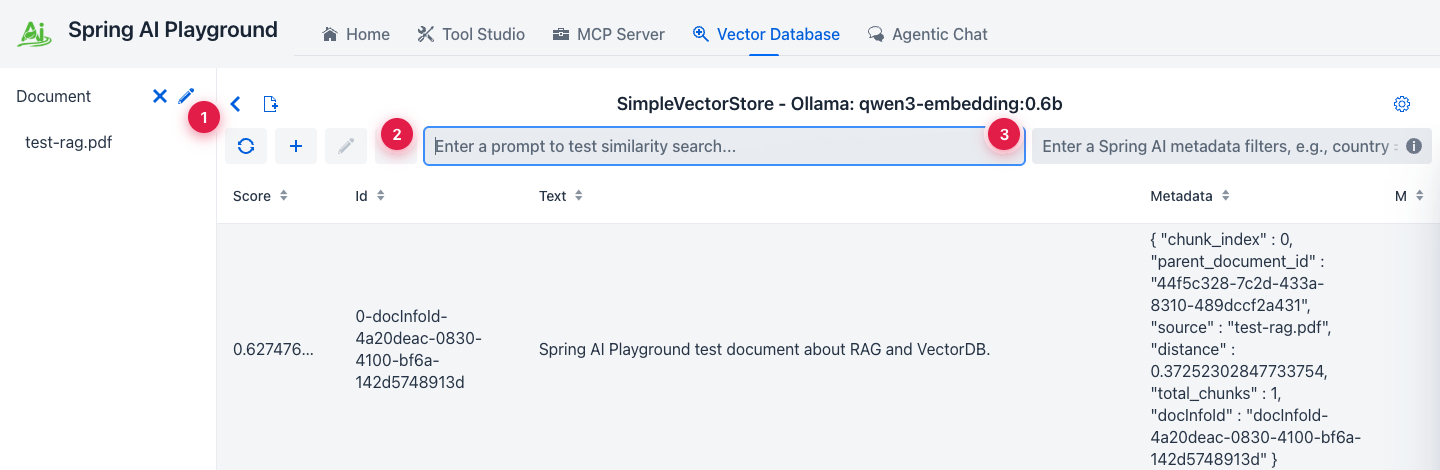 ① Sources sidebar - indexed documents above, saved RAG pipelines below, ② similarity-search input (hit Enter to query), ③ Spring AI metadata filter expression - same syntax you'd use in code.
-
Click the document-add icon in the header to open the New Document & ETL Pipeline dialog. Drop in a PDF, DOC/DOCX, PPT/PPTX, MD, HTML, JSON, or TXT file - up to 20 MB.
-
Check the Extract section. The document reader is picked from the file extension, and reader-specific options appear with it: a
.mdfile selectsMARKDOWNand offers code-block, blockquote, and horizontal-rule handling. Override the reader when the default does not suit the file, for example choosingTIKAfor a PDF of scanned slides.
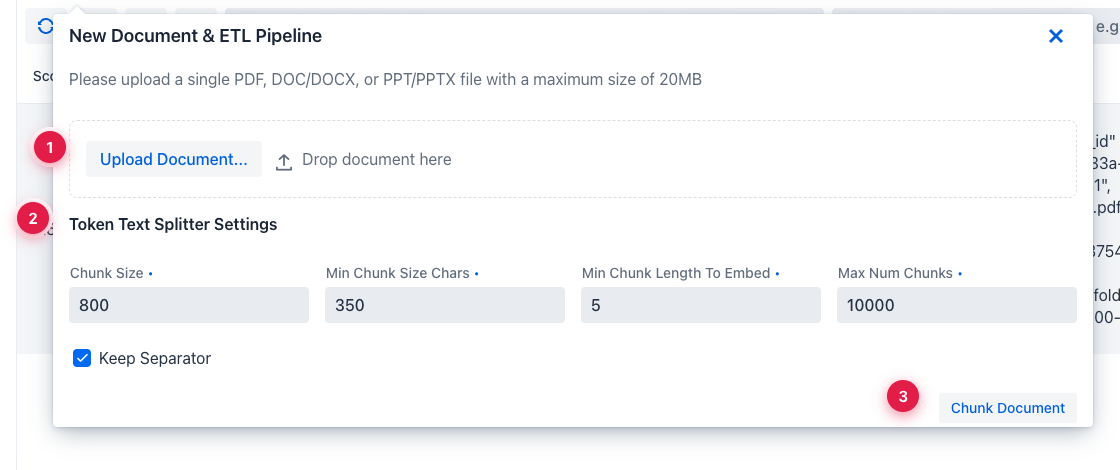 ① upload the file (drag-drop also works), ② the auto-recommended reader plus its per-type options, ③ token-splitter settings -
 Chunk Size and Min Chunk Size Chars move retrieval quality the most.
-
Tune the splitter only if the defaults do not match your content shape. Optionally enable a metadata enricher under Metadata Enrichment - each one costs one LLM call per chunk, so keep it off for a first pass on a large file.
-
Click Chunk Document. This runs extraction and splitting and shows you the chunks before embedding, so you can adjust and re-run without re-uploading. When the chunks look right, click Embed and insert.
-
Run a similarity search to confirm retrieval works. Use a phrase that should be in the document.
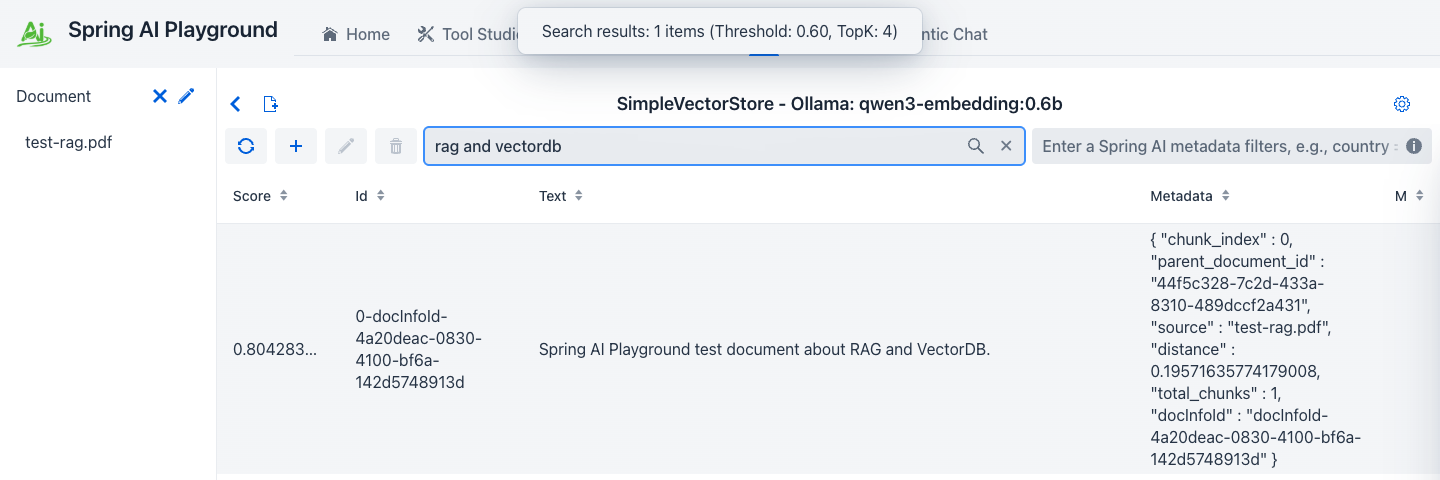 ① cosine similarity score (0.0-1.0), ② the retrieved chunk text, ③ metadata used by Spring AI filter expressions (
source, chunk_index, custom fields).
Why this matters
Bad RAG starts here, not in chat. If the chunk you expect doesn't come back here, the chat answer will be ungrounded, and no amount of prompting fixes that.
Read the scores, don't trust a fixed number
Similarity scores are not comparable across embedding models, so no single cutoff is universally right. The shipped default is 0.35, picked because with qwen3-embedding:0.6b a chunk that answers the question scores roughly 0.48 to 0.65, while a question the corpus cannot answer tops out around 0.25. See the measured ranges.
If you switch embedding models, re-check it here: run a question you know the answer to and note the score of the correct chunk, then run an unrelated question and note its best score. Any cutoff between the two works. Search Settings (the cog) holds the global value, and each RAG pipeline keeps its own copy.
Don't change the embedding model after indexing
The vector store stores raw vectors. Switching from qwen3-embedding:0.6b to a different model leaves the old vectors in place but indexed in a different space. Re-import or rebuild before trusting retrieval again.
What you also got
Embedding while no RAG pipeline exists yet creates a default retrieval pipeline, All documents (simple), that searches the whole store, so your document is immediately selectable in chat. Everything about how retrieval behaves - Top-K, threshold, query rewriting - lives on that pipeline; see Pipeline Studio.
Next: Tutorial 5 - Chat With RAG uses this document as grounded context.