Default MCP Servers
Where: top navigation → MCP Server → the sidebar's Inactive MCP section.
Spring AI Playground ships with 58 default MCP server connections spread across 50 vendor-official remote entries (Streamable HTTP - Gmail, Outlook, Notion, GitHub, Linear, Atlassian, Stripe, BigQuery, ...) and 8 community stdio entries per OS (modelcontextprotocol/servers - Git, Memory, Puppeteer, MCP Everything, ...). They are ready to activate the moment the desktop launcher is running - you do not need to type a URL or hunt down a stdio command yourself to start chatting against an external service.
The MCP Server sidebar does not connect them all by default - every entry starts in the sidebar's Inactive MCP section as a ghost row. Clicking one promotes it into the right-hand configuration form pre-filled with the catalog template, so you only fill in your local secret / tenant before Save & Connect. The catalog itself lives in src/main/resources/mcp/default-mcp-specs*.json and the activation/filter state lives entirely in the sidebar.
Browse all 58 catalog entries
Click a card to jump to its full reference (with transport / auth defaults / required env / docs expanded) on the right sub-page - same UX as the Default Tools directory and the MCP Server Setting drawer in Tool Studio. Six reference pages organise the catalog by category cohort: Productivity & Communication · Dev & Project Management · Data & Cloud · Business · Search · Examples.
Filter modes: combine a search keyword with one or more Category / Tag / Transport chips - search is AND across the chip filters; chip selections within a group are OR (a card is shown when its category OR tag OR transport matches any selected chip in that group, and the search keyword matches its name or vendor or description).

Read, search, and send Gmail messages, manage labels and drafts. Google Workspace MCP (Preview).
Vendor Google · T1 vendor
Auth OAuth 2.1
Read, send, and organise Outlook mail across folders. Routed through Microsoft 365 Agent365 - requires your tenant ID (MS_TENANT_ID).
Vendor Microsoft · T1 vendor
Auth OAuth 2.1

Create, list, and manage Google Calendar events, attendees, reminders, and recurring schedules. Google Workspace MCP (Preview).
Vendor Google · T1 vendor
Auth OAuth 2.1
Browse Outlook calendars, schedule and update meetings, manage availability via Microsoft 365 Agent365. Requires MS_TENANT_ID.
Vendor Microsoft · T1 vendor
Auth OAuth 2.1

Browse, create, and edit Notion pages, databases, and properties. Vendor-hosted remote MCP with OAuth 2.1 + PKCE.
Vendor Notion · T1 vendor
Auth OAuth 2.1

Kakao aggregator hub - KakaoTalk send-to-self, Talk Calendar, KakaoMap, Gift, Melon, plus 200+ third-party MCPs. KR-focused.
Vendor Kakao · T1 vendor
Auth Bearer (OTT-derived)
Read and post Slack messages across channels and DMs, search the workspace, manage user/channel metadata. Slack's official remote MCP.
Vendor Slack · T1 vendor
Auth OAuth 2.1
Send messages to Teams chats and channels, search conversations, manage meetings via Microsoft 365 Agent365. Requires MS_TENANT_ID.
Vendor Microsoft · T1 vendor
Auth OAuth 2.1

Create, query, and update Linear issues, projects, cycles, and teams. Linear's official remote MCP with OAuth 2.1.
Vendor Linear · T1 vendor
Auth OAuth 2.1
Atlassian Rovo (Jira + Confluence)

Read and update Jira issues and Confluence pages via Atlassian's official Rovo MCP. Replaces legacy /v1/sse on 2026-06-30.
Vendor Atlassian · T1 vendor
Auth OAuth 2.1

Search and manage GitHub repositories, issues, pull requests, code reviews, and Actions. Sign in via OAuth Device Flow or pass a personal access token...
Vendor GitHub · T1 vendor
Auth OAuth 2.1 / PAT
Search the full Microsoft Learn documentation catalogue - Azure, .NET, Windows, Power Platform, Microsoft 365 and more. No authentication required, free to use.
Vendor Microsoft · T1 vendor
Auth None

Investigate Sentry issues and events across projects, query alert rules, releases, and performance data. OAuth with device-code flow.
Vendor Sentry · T1 vendor
Auth OAuth 2.1

Manage Asana tasks, projects, sections, and custom fields across workspaces. Asana's official OAuth MCP (SSE transport).
Vendor Asana · T2 vendor
Auth OAuth 2.1
Query and update Azure DevOps repos, work items (Boards), pipelines, and pull requests within your organisation. Preview, requires AZURE_DEVOPS_ORG.
Vendor Microsoft · T2 vendor
Auth OAuth 2.1

Pull up-to-date library documentation and code examples by library name and version, designed to ground AI code generation. Free, no authentication.
Vendor Upstash · T2 vendor
Auth None
Search Korean law, court precedents, Constitutional Court decisions, ordinances, and administrative rules. Wraps the Ministry of Government Legislation Open...
Vendor chrisryugj · T2 community
Auth None

[macOS] Local Git repository operations - log, diff, status, blame, show. Read-only by default. The activated form is pre-filled to run: uvx mcp-server-git...
Vendor modelcontextprotocol/servers · T2 community
Auth STDIO

[macOS] Headless Chrome automation - navigate, click, fill forms, screenshot, evaluate JavaScript in-page. The activated form is pre-filled to run: npx -y...
Vendor modelcontextprotocol/servers · T2 community
Auth STDIO
[macOS] Microsoft's accessibility-snapshot browser automation - successor to the Puppeteer reference. Drives Chromium/Firefox/WebKit without screenshot vision...
Vendor Microsoft · T2 vendor
Auth STDIO

List, read, and upload files in Google Drive, manage permissions, shared drives, and folder structure. Google Workspace MCP (Preview).
Vendor Google · T1 vendor
Auth OAuth 2.1
Browse and edit OneDrive personal files and SharePoint sites, lists, document libraries via Microsoft 365 Agent365. Requires MS_TENANT_ID.
Vendor Microsoft · T1 vendor
Auth OAuth 2.1

Cloudflare umbrella covering Workers, R2, KV, D1, Workers AI, Browser Rendering, Hyperdrive, Queues, Logs, and observability.
Vendor Cloudflare · T2 vendor
Auth OAuth 2.1

Inspect and manage Vercel projects, deployments, domains, environment variables, and observability via OAuth.
Vendor Vercel · T2 vendor
Auth OAuth 2.1

Manage Netlify sites, deploys, build hooks, edge functions, and form submissions via OAuth.
Vendor Netlify · T2 vendor
Auth OAuth 2.1
Inspect Heroku apps, dynos, releases, config vars, addons, and logs via OAuth.
Vendor Heroku · T2 vendor
Auth OAuth 2.1

Manage Render web services, background workers, cron jobs, and deploys via OAuth.
Vendor Render · T2 vendor
Auth OAuth 2.1

Deploy and manage Cloud Run services, revisions, traffic splits, and jobs. Uses Google OAuth with the cloud-platform scope.
Vendor Google · T2 vendor
Auth OAuth 2.1
Manage GCS buckets and objects - list, upload, download, IAM, lifecycle rules. Uses Google OAuth.
Vendor Google · T2 vendor
Auth OAuth 2.1

Query datasets, manage tables and views, and run jobs in Google BigQuery. Google OAuth with the bigquery scope.
Vendor Google · T2 vendor
Auth OAuth 2.1

Provision and query Neon serverless Postgres - branches, roles, schema migrations, query analysis. OAuth.
Vendor Neon · T2 vendor
Auth OAuth 2.1

Manage Supabase projects end-to-end - Postgres queries, Auth users, Storage buckets, Edge Functions. OAuth.
Vendor Supabase · T2 vendor
Auth OAuth 2.1

Query PlanetScale MySQL databases, manage branches, deploy schema changes via OAuth.
Vendor PlanetScale · T2 vendor
Auth OAuth 2.1
Administer Google Cloud SQL instances (MySQL, Postgres, SQL Server) - databases, users, backups, and queries.
Vendor Google · T2 vendor
Auth OAuth 2.1
Query Google Cloud Spanner instances and databases - globally distributed, strong consistency, SQL.
Vendor Google · T2 vendor
Auth OAuth 2.1

Query and manage Firestore documents, collections, composite indexes, and security rules via Google OAuth.
Vendor Google · T2 vendor
Auth OAuth 2.1

[macOS] Query a local SQLite database - SELECT, schema introspection, plus INSERT/UPDATE/DELETE when permitted. The activated form is pre-filled to run: uvx...
Vendor modelcontextprotocol/servers-archived · T2 community
Auth STDIO
Query Korea's official national statistics in natural language from KOSIS. Official pilot MCP by the National Data Office - 1,360+ statistics, 260,000+ tables. No API key, read-only.
Vendor National Data Office · T2 gov
Auth None

Manage Stripe payments, customers, subscriptions, invoices, refunds, product catalogue, and Connect. OAuth.
Vendor Stripe · T2 vendor
Auth OAuth 2.1

Manage PayPal orders, refunds, payouts, subscriptions, and invoicing through PayPal's official OAuth MCP (SSE).
Vendor PayPal · T2 vendor
Auth OAuth 2.1

Square payments, catalogue, inventory, customers, and orders across locations. Beta program from Block.
Vendor Block · T2 vendor
Auth OAuth 2.1

HubSpot CRM contacts, companies, deals, pipelines, lists, and engagements. OAuth 2.1 + PKCE.
Vendor HubSpot · T2 vendor
Auth OAuth 2.1

Intercom conversations, contacts, tags, segments, and help-centre articles. US workspace region only.
Vendor Intercom · T2 vendor
Auth OAuth 2.1

Run Mixpanel product analytics queries - events, funnels, retention, cohorts, and user properties. OAuth.
Vendor Mixpanel · T2 vendor
Auth OAuth 2.1

Browse Figma files, frames, components, styles, comments, and design system tokens. OAuth.
Vendor Figma · T2 vendor
Auth OAuth 2.1
Manage Canva designs, brand kits, folders, templates, and assets through the official Canva Connect MCP.
Vendor Canva · T2 vendor
Auth OAuth 2.1

Manage Webflow sites, CMS collections, items, and form submissions via OAuth (SSE).
Vendor Webflow · T2 vendor
Auth OAuth 2.1

Google Maps Places, Directions, Distance Matrix, Geocoding, and Street View for grounding LLM responses with real-world geo data.
Vendor Google · T2 vendor
Auth OAuth 2.1
[macOS] Persistent knowledge graph for cross-session memory - entities, relations, and observations in a local JSON file. The activated form is pre-filled to...
Vendor modelcontextprotocol/servers · T2 community
Auth STDIO
[macOS] Structured step-by-step reasoning helper - logs intermediate thoughts to the server for review, revision, or branching. The activated form is...
Vendor modelcontextprotocol/servers · T2 community
Auth STDIO
AI-optimised web search and answer engine for grounding LLMs with up-to-date facts and sources. Requires TAVILY_API_KEY.
Vendor Tavily · T1 vendor
Auth API key
Neural web search by Exa - semantic ranking, source-aware retrieval, and high-quality result snippets. Requires EXA_API_KEY (x-api-key header).
Vendor Exa · T1 vendor
Auth API key
Web scraping, crawling, and structured data extraction with anti-bot handling. Bearer-authenticated with FIRECRAWL_API_KEY.
Vendor Firecrawl · T1 vendor
Auth Bearer
Jina AI Reader (URL-to-clean-markdown) and search APIs for LLM-grounded retrieval. Bearer-authenticated with JINA_API_KEY.
Vendor Jina AI · T2 vendor
Auth Bearer
Real-time Google, Bing, Baidu, DuckDuckGo, Naver and other SERP scraping with structured JSON. API key embedded in URL path (SERPAPI_API_KEY).
Vendor SerpAPI · T2 vendor
Auth API key

[macOS] Brave Search API - web, local, news, image, and video search. Outbound calls only to api.search.brave.com (no SSRF surface). The activated form is...
Vendor Brave · T1 vendor
Auth STDIO
AI-generated, structured wikis for any public GitHub repository - architecture diagrams, module-level explanations, navigable source links, and a...
Vendor Cognition · T2 vendor
Auth None
MCP Everything (Reference Test Server)
[macOS] Official MCP reference test server exercising every protocol feature - tools, resources, prompts, sampling, completion, logging, progress, root...
Vendor modelcontextprotocol · T2 vendor
Auth STDIO
Sidebar filtering and form prefill
The MCP Server screen has two cooperating regions - a filter bar at the top of the left sidebar (①) and a connection form in the right pane (②). Clicking any catalog row in the sidebar prefills the form on the right without leaving the page.
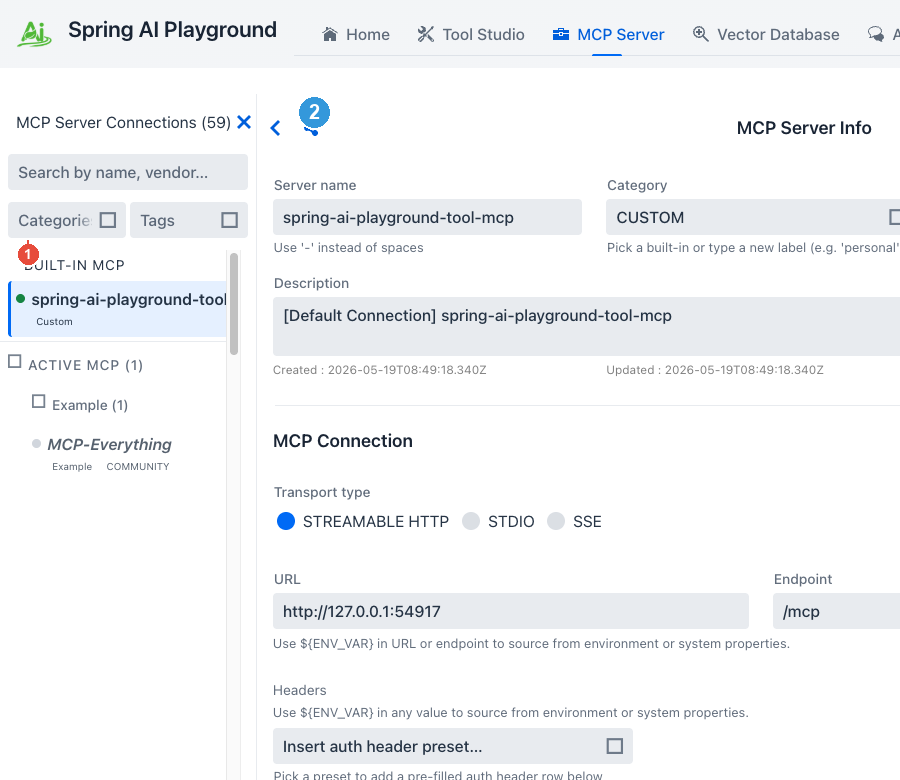
① Filter bar
Built from the shared webui/common/sidebar/SidebarFilterBar widget (Tool Studio uses the same one). Three controls that compose AND across groups, OR within a group:
- Search - matches against server name, vendor, description, and - for active connections only - live tool names returned by
listTools. 200 ms debounce before re-rendering. - Categories multi-select - the 14 built-in catalog categories plus
Customfor user-added entries:Example · Productivity · Storage · Communication · Project Management · Dev · Search · Cloud · Database · Public Data · Finance · CRM · Design · Utility · Custom. - Tags multi-select - drawn from the union of every catalog entry's tags and every active server's tags. Cohort vocabulary:
aggregator · beta · community · free-tier · geo · global · korea · legal · pipeline · preview · us.
For example, picking Productivity + preview narrows to Gmail and Google Calendar (the two preview-stability Workspace entries); a search term layered on top further trims the visible count. The sidebar header counter swaps between (N) and (N filtered of M) when a filter is active; an empty match offers a Clear filters button.
② Connection form
Clicking any Inactive MCP entry copies the catalog template into the right pane:
- Transport -
STREAMABLE_HTTPfor remote entries,STDIOfor the per-OS entries - URL or Command + Args - with
${ENV_VAR}placeholders for anything secret; STDIO arguments render as one row per argv element - OAuth issuer URI + scopes - pre-filled for OAuth-protected entries
- Category + Tag chips - matching the catalog row
- Inline description - carrying prerequisites and a
Docs:link - Headers preset - Bearer / Basic / API Key, with
${VAR}substitution wired in (OAuth 2.1 lives in its own checkbox-toggled sub-form)
The row stays in the Inactive layer until you click Save & Connect; on save it moves into the Active layer under the same category group and the playground spawns the child process (STDIO) or opens the HTTP transport. For OAuth entries this records the registration without yet connecting - see MCP Server → OAuth 2.1 Authorization Code for the Authorize click.
Two ways to use these entries
Activate from the sidebar
The simplest mode - open MCP Server, scroll the sidebar's Inactive MCP layer, click the entry you want. The right pane fills in:
- transport (
STREAMABLE_HTTPfor remote entries,STDIOfor the per-OS entries) - URL or command + args, with
${ENV_VAR}placeholders for anything secret - default OAuth issuer URI + scopes for OAuth-protected vendors
- category + tags chips matching the catalog row
- inline description with prerequisites and the upstream
Docs:link
Fill in only what's local to you (an API key, a tenant ID, the OAuth Authorize click) and Save & Connect. The row moves into the Active MCP sidebar layer; the in-app MCP Inspector becomes live; the connection is available to Agentic Chat as a tool source.
- → MCP Server: Catalog & Sidebar Filtering - 3-layer sidebar · filter bar · activation
- → MCP Server: OAuth 2.1 Authorization Code - for the OAuth entries (Gmail, Outlook, Notion, Linear, Atlassian, ...)
- → MCP Server: MCP Inspector - exercise tools, resources, prompts before relying on the connection from chat
- → Agentic Chat - call them from a model conversation
- → Tutorial 2 - Connect an External MCP Server - first-time activation walkthrough
Compose with custom servers and authored tools
The deeper mode - combine multiple catalog connections with your own custom servers and Tool Studio-authored tools in one chat. Agentic Chat picks any subset of active MCP servers per turn, so an agent can read your Notion + look up a Linear ticket + write a Slack reply in the same conversation. The catalog is the fastest path to that composition because it skips the URL-typing / OAuth-discovery / requiredEnv guesswork for the most common vendors.
- → Tool Studio: Key Tool Studio Capabilities - author and publish custom tools that ride alongside catalog connections
- → Default Tools directory - the parallel 116-tool JavaScript inventory the built-in MCP server publishes
End-to-end flow
[ Catalog entry  · Custom Server form ]
            │
            ▼
   [ Configuration form (pre-filled or blank) ]
            │
            ▼
   [ Save & Connect  ✅ ] ──── connection becomes Active
            │
            ▼
   [ Active MCP connection ]
            │
            ├── In-app MCP Inspector - exercise tools / resources / prompts / sampling / elicitation
            │
            ├── Agentic Chat - call the connection's tools from a model turn
            │
            └── Expose on built-in server (M8) - re-publish the tools you select
                (individually or Select all, across one or several connections) on
                the built-in MCP server, so Agentic Chat and external /mcp clients
                call them on one endpoint
The catalog only changes step 1 (entry selection + form pre-fill). Everything after - Test Connection, OAuth Authorize, Inspector, Agentic Chat - is the same path a custom server takes. The catalog is sugar on top of the connection management surface, not a separate runtime.
Re-publishing external tools to external clients
Through the Composed Tools drawer you re-publish the external tools you select - individually or with Select all, across one or several active connections - on the built-in MCP server, each wrapped with a risk level, optional HITL, and logging. They join the Default Tools on one endpoint (http://localhost:8282/mcp), callable by Agentic Chat and any external /mcp client. See Default Tools → Expose and call.
Why a built-in catalog matters
Most MCP client implementations require the user to type each external server's URL by hand, look up OAuth issuer URIs from a vendor doc, and discover which env vars requiredEnv declares. That's three lookup hops before any tool runs.
Spring AI Playground's catalog pre-resolves those hops. The 50 remote entries carry the vendor-recommended Streamable HTTP URL + OAuth defaults + tenant-ID hints; the 8 stdio entries carry the npx / uvx command + args verified against modelcontextprotocol/servers. The desktop launcher even picks the OS-matching stdio variant automatically (npx for macOS / Linux, npx.cmd for Windows) so the pre-filled command can be saved without editing on any host.
Every entry is either vendor-official (Tier 1 - listed under the vendor's own documentation) or community-published (Tier 2 - modelcontextprotocol/servers and adjacent maintained projects). The catalog file shipped with the app is the source of truth; updates land as part of regular releases rather than requiring users to chase vendor doc URLs.
How catalog trust feeds the risk score
Those tiers are not just provenance labels - they feed the connection risk preview. Each catalog entry carries two machine-readable fields consumed by McpServerRiskCalculator:
trustSignals-vendor-officialzeroes the trust axis;community-curatedscores it 1. A server you type by hand scores 2 (unknown origin) - which is why activating from the catalog generally lands a lower risk chip than typing the same URL manually.docsAdequate- when set (as the curated catalog entries are), the documentation axis takes no gap penalty, and the per-tool documentation penalty is waived for that server's tools.
So a vendor-official catalog entry over HTTPS typically computes L1 - Safe or L2 - Low, while an unknown hand-typed URL with no auth can trip a floor rule straight to L5 - Critical. See MCP Server Safety for the full rubric.
Each card above carries this typical level as a colored chip - L2 for a vendor-official OAuth server, L3 for a Bearer / API-key one. It's the level the connection scores at fresh activation; the connection form recomputes it live, and it rises if you grant broad OAuth scopes (admin, write_all, ... → L5) or the server advertises write capability. Per-tool levels are discovered on connect - see them in the Inspector.
Composition recipes
The reference pages list what's available; composition recipes show how to chain multiple catalog connections (and custom tools) into a useful workflow. Three combinations worth bookmarking:
- PR digest → Slack -
GitHub(catalog) →openaiResponseGenerator(default tool) →Slack(catalog), ending in an agent that posts release-note summaries to a channel. - Mail + calendar triage -
Gmail(catalog) →Google Calendar(catalog) → custom tool, ending in an agent that drafts replies and books follow-ups in one turn. - Issue tracker grounding -
Linear(catalog) →Atlassian Rovo(catalog) →Notion(catalog), ending in an agent that cross-references tickets across all three trackers when answering project questions.
All three live on Streamable HTTP with OAuth 2.1 - once you've completed the Authorize click for each vendor, the playground holds encrypted refresh tokens and the agent reaches all three without re-prompting.
Environment variables - short list
Some catalog entries depend on environment-backed values and stay inert until those are set. The full per-entry breakdown lives on each reference page; the most common are:
| Env var | Used by | Why |
|---|---|---|
MS_TENANT_ID |
Outlook Mail, Outlook Calendar, Microsoft Teams |
Microsoft 365 Agent365 tenant routing - entries fail fast at connect time if missing |
MEMORY_FILE_PATH |
Memory (Knowledge Graph) (stdio) |
Override the default JSON store path for cross-session memory |
BRAVE_API_KEY |
Brave Search (stdio) |
Brave Search API key - passed through stdio env |
TAVILY_API_KEY / EXA_API_KEY / SERPAPI_API_KEY / JINA_API_KEY / FIRECRAWL_API_KEY |
Search-category entries | Vendor API keys for Tavily, Exa, SerpAPI, Jina AI, Firecrawl - surfaced via ${VAR} placeholders in the headers |
| OAuth client secrets | Any OAuth entry with a non-public client | Storable as ${SOME_OAUTH_CLIENT_SECRET} in the OAuth sub-form's Client secret field |
${VAR} placeholders in any value field resolve from the OS environment (or a JVM system-property fallback) at connect time; the persisted JSON keeps the literal placeholder string, never the resolved secret. A backend SecretMasking filter additionally sweeps connection-error notifications and per-call logs to replace resolved values with *** so credentials cannot leak into the playground UI - see Safety Architecture → Secret masking.
→ MCP Server: ${ENV_VAR} substitution - placeholder syntax and the missing-reference fail-fast behaviour.