Traces
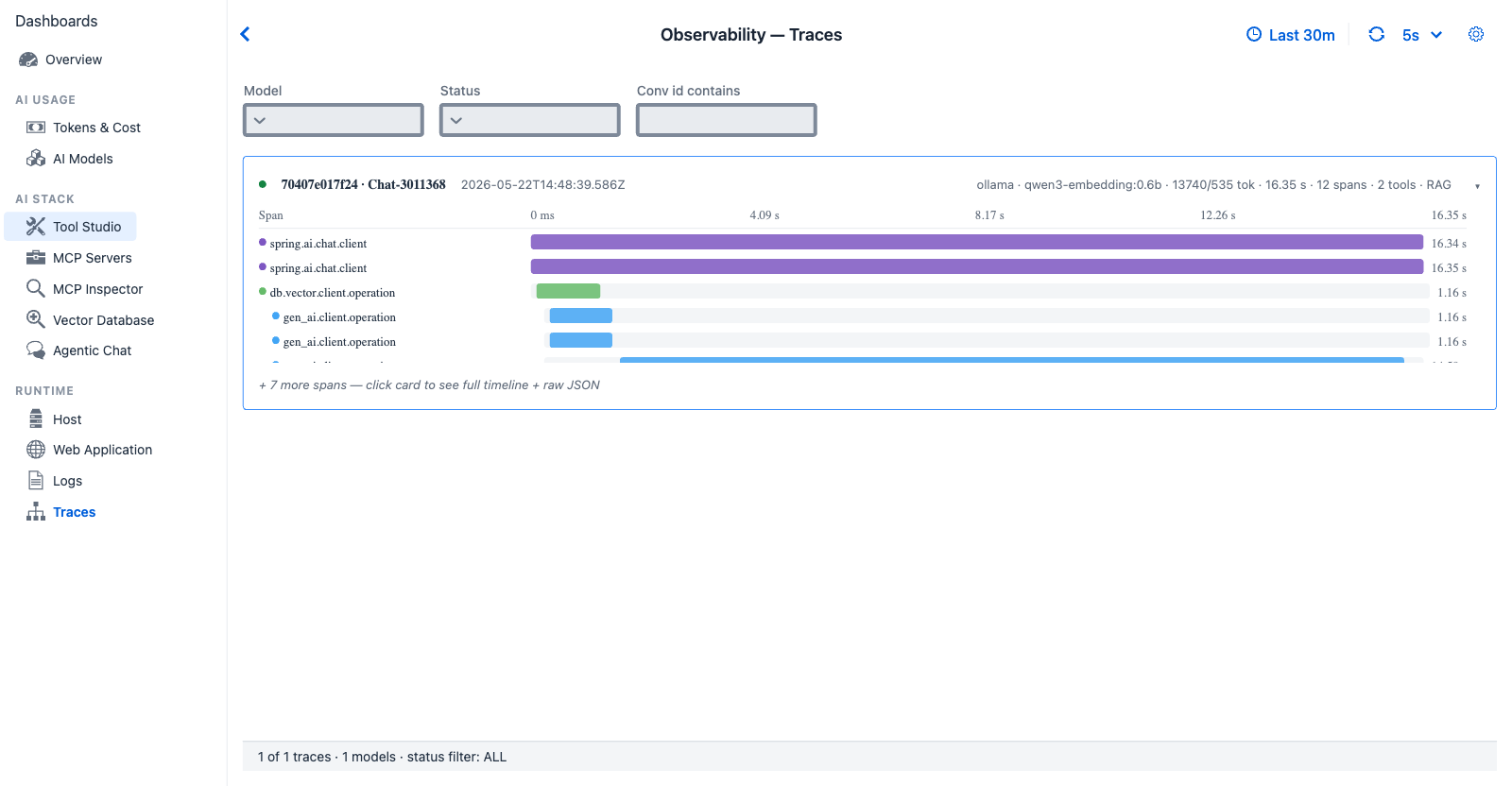
Traces tab - the live raw trace stream. The first row expands inline to a span Gantt (Spring AI advisor chain → model call); clicking the card opens the Trace Detail dialog with the full timeline and raw JSON.
Purpose - the raw trace stream. Every other dashboard tab aggregates from this view; Traces shows it without rollup. The headline operator drill-down for "give me the unfiltered evidence."
When to look here
- "Show me everything that just happened" - open the tab, watch the live stream.
- "I have a trace ID from a log line - find it" - Conv id contains filter (conversation id only; for a trace ID, use the Logs tab Jump to trace).
- "What's in this trace's span tree?" - click any row → Trace Detail dialog.
- "Filter to a specific model" - Model dropdown.
- "Find every errored trace" - Status filter → ERROR.
Data source
Reactor ObservabilityRingBuffer.liveStream() (multicast Sinks.Many.directBestEffort()) plus snapshot() on attach. The Traces tab subscribes with sample(500 ms) so dropped frames coalesce silently into the next emission.
Controls
- Model dropdown -
ALLplus distinct model names auto-populated from the ring buffer - Status dropdown -
ALL,OK,ERROR,CANCELLED - Conv id contains text field - substring match on conversation id
The Observability global refresh interval is honored, but Traces also subscribes to the live Sinks.Many stream so new rows appear without polling. The manual refresh button re-applies the filter to a static snapshot.
Row structure
| Element | Source |
|---|---|
| Trace ID (short) | TraceRecord.traceId truncated |
| Conversation badge | TraceRecord.conversationId truncated (e.g. Chat-6af5b06) |
| Timestamp | TraceRecord.startEpochMs |
| Provider · model | gen_ai.system · gen_ai.response.model |
| Tokens | inputTokens / outputTokens tok |
| Duration | TraceRecord.durationMs human-formatted |
| Span count | TraceRecord.spans.size() |
| Status dot | Green / red by TraceRecord.status |
| Inline span timeline (top row only) | Mini Gantt of the spans for quick triage |
Drilldown - Trace Detail dialog
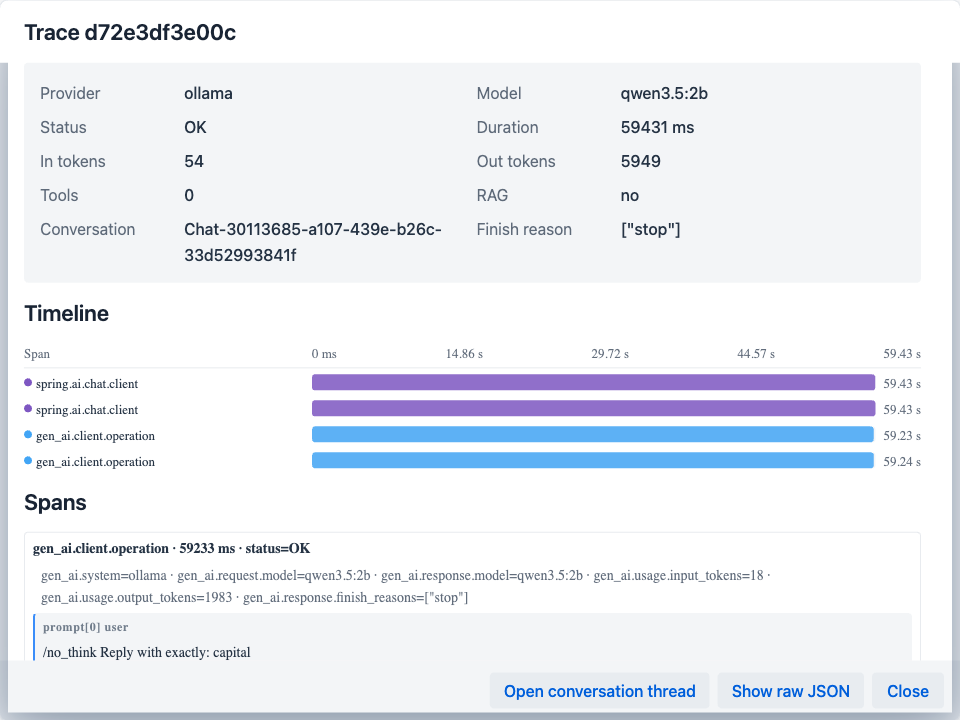
Trace Detail dialog - the Timeline section is a Gantt of every span in the TraceRecord; the Spans section lists their attributes inline. "Open conversation thread" routes to the Conversation Thread dialog for the parent conversation.
Click any trace row to open. Provides:
| Section | Contents |
|---|---|
| Header | Trace <traceId-short> |
| Summary grid | Provider · Model · Status · Duration · In/Out tokens · Tools count · RAG flag · Conversation (full ID) · Finish reason |
| Timeline | Custom SpanTimelineCanvas web component rendering each span as a horizontal Gantt bar |
| Spans list | <span name> · <duration ms> · status=<OK/ERROR> plus inline attributes |
| Open conversation thread button | Navigates to the Conversation Thread dialog for the parent conversation (sibling drilldown documented below) |
| Show raw JSON button | Opens a sub-dialog with the full TraceRecord JSON for the selected trace |
| Close button | Dismiss |
Drilldown - Conversation Thread dialog
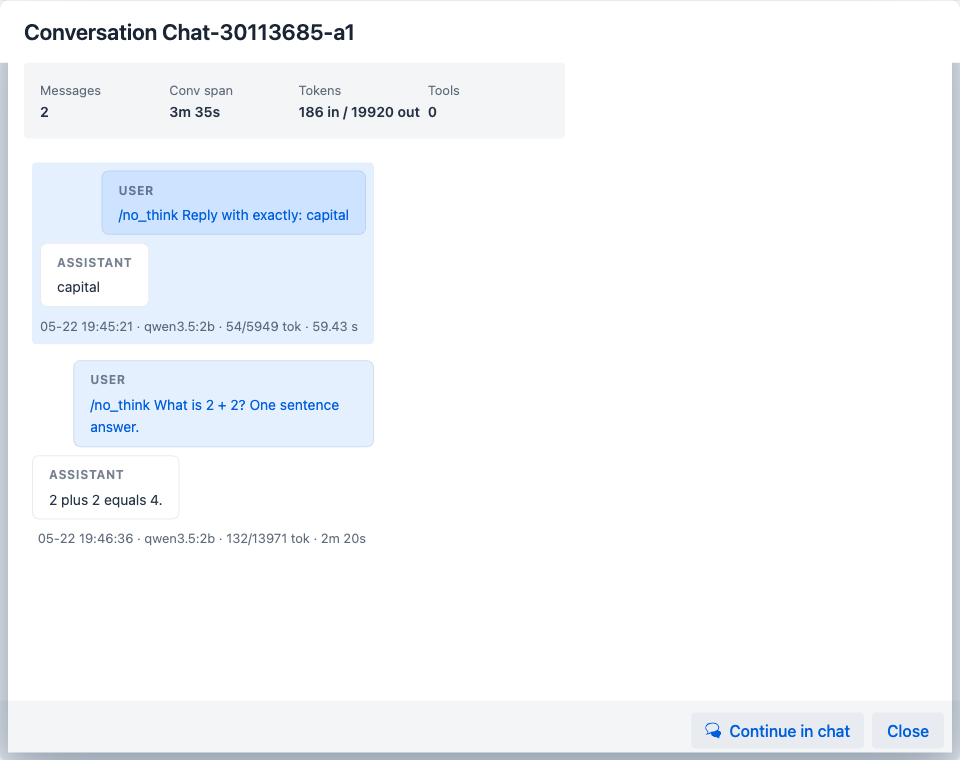
Conversation Thread dialog - ConversationMessageExtractor deserialises the trace's prompt and completion content attributes into a structured chronological view. Tool calls (when present) render as inline cards between turns.
A sibling drilldown to Trace Detail. Reached from two entry points:
- The Conversations grid on the Agentic Chat dashboard - click any conversation row.
- The Open conversation thread button on the Trace Detail dialog above - drilling from a specific turn back out to the whole conversation it belongs to.
Where Trace Detail is per-turn (one TraceRecord), Conversation Thread is per-conversation (all TraceRecords sharing the same conversationId, reassembled into a chronological user / assistant / tool thread).
Contents
| Section | Contents |
|---|---|
| Header | Conversation <conversationId-short> |
| Summary strip | Messages · Conv span · Tokens (in/out) · Tools |
| Message thread | Chronological user / assistant / tool messages with per-message footer (date · model · token count). Tool calls render as inline cards between turns. |
| Continue in chat button | Navigates to Agentic Chat with the same conversation loaded |
| Close button | Dismiss |
Content capture caveat - message bodies are present only if spring.ai.playground.observability.capture-prompt-content=true (the default). When that property is false, the thread shows roles and counts only - bodies do not flow into the trace stream. See Observability Architecture → Configuration surface for the property reference.
Cross-references
- Logs - drill from a log line to the trace it came from
- Agentic Chat - aggregated per-conversation view (one row per conversation, not per trace)
- Observability Architecture → Storage tiers -
ObservabilityRingBufferdesign + the JSON persistence shape used by Show raw JSON - Observability Architecture → Live stream - the Reactor
Sinks.Manyand 500 ms sampling