External connections
Spring AI Playground sits between three kinds of connection - see How it all connects for the picture. This is the practical guide to wiring each one:
- the AI clients that consume the built-in MCP server,
- the model providers it runs on, and
- the external MCP servers it proxies.
Connect your AI clients
The app publishes a built-in MCP server in the same process as the UI:
- Streamable HTTP -
http://localhost:8282/mcp(change the port withSERVER_PORT) - stdio - start with the
mcp-stdioprofile (SPRING_PROFILES_INCLUDE=mcp-stdio) for hosts that spawn a local process; see Alternative Runtimes
Most clients connect over Streamable HTTP. Drop the matching config below in - it points at the default endpoint and uses spring-ai-playground as the server name (rename it to anything you like).
 Claude Code - run (docs):
claude mcp add --transport http spring-ai-playground http://localhost:8282/mcp
 Cursor -
 ~/.cursor/mcp.json (docs):
{
  "mcpServers": {
    "spring-ai-playground": { "url": "http://localhost:8282/mcp" }
  }
}
 VS Code (Copilot) -
 .vscode/mcp.json (docs):
{
  "servers": {
    "spring-ai-playground": { "type": "http", "url": "http://localhost:8282/mcp" }
  }
}
 Codex (CLI) -
 ~/.codex/config.toml (docs):
[mcp_servers.spring_ai_playground]
url = "http://localhost:8282/mcp"
 opencode -
 ~/.config/opencode/opencode.json (docs):
{
  "mcp": {
    "spring-ai-playground": { "type": "remote", "url": "http://localhost:8282/mcp", "enabled": true }
  }
}
 OpenClaw -
 openclaw.json (docs):
{
  "mcpServers": {
    "spring-ai-playground": { "url": "http://localhost:8282/mcp" }
  }
}
Cline, Windsurf, Zed, and other MCP hosts follow the same pattern - add a Streamable HTTP server pointing at http://localhost:8282/mcp. Check your client's MCP docs for the exact field names.
localhostserver. To use the playground from Claude Desktop, either run it as a stdio server with themcp-stdioprofile and add it toclaude_desktop_config.json, or expose the HTTP endpoint through a tunnel. See Build custom connectors via remote MCP.
Once connected, the client sees your Local-Pass tools - and any proxied or composed external tools - in its tools/list.
Require a bearer token
By default the built-in server answers anyone who can reach the port, which is fine on loopback and wrong anywhere else. A shared-secret bearer token closes it, and there are two ways to set one.
In the app. Open MCP Server, click the gear icon, and under Authentication switch from None to Bearer token. A 256-bit token is generated for you (the eye reveals it, Generate rotates it, Copy puts it on the clipboard); Apply turns the gate on immediately, with no restart. Switching back to None reopens the endpoint. The token is stored encrypted under .security/ in the app home, bound to this machine and user, and the section can only be viewed and changed from a browser on the machine that runs the app.
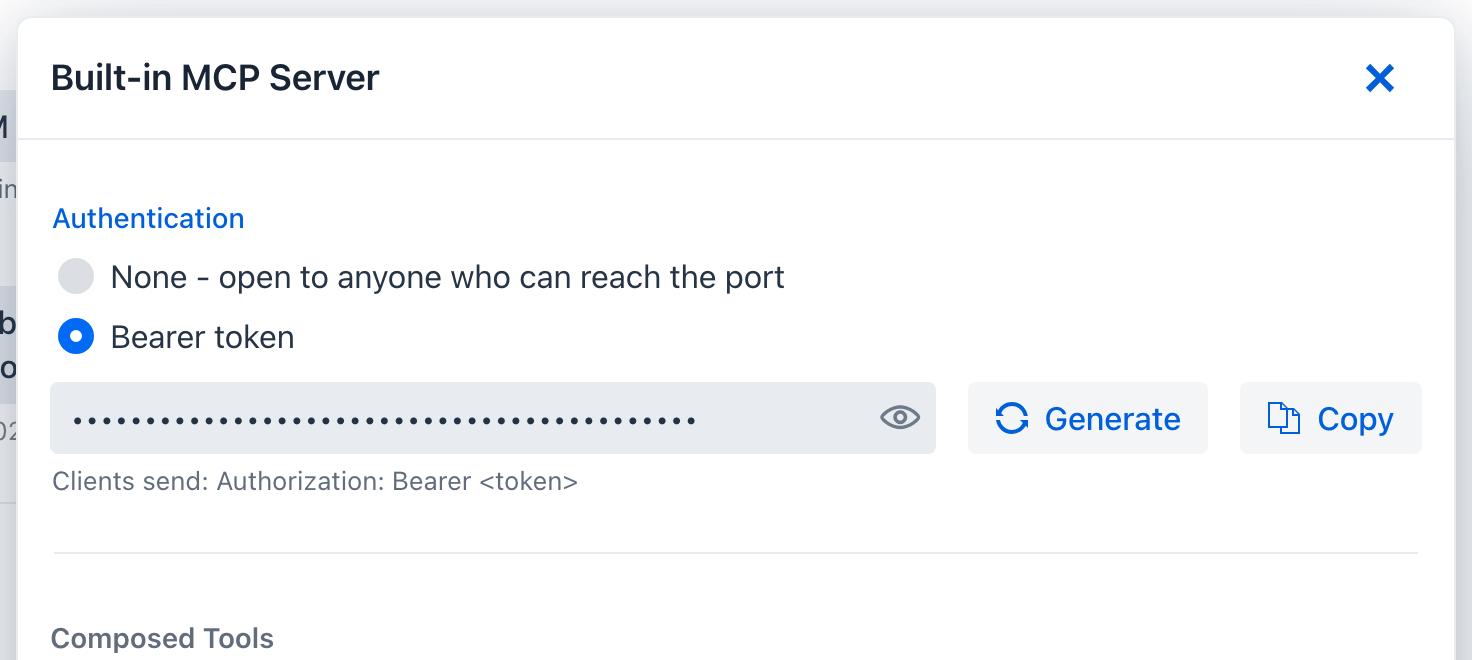
By configuration. Set spring.ai.playground.mcp-server.auth-token - the declarative route for Docker and shared deployments. Configuration wins: while the property is set, the Authentication section is read-only and says so. Generate a token once:
openssl rand -hex 32
Then supply it through whichever launch mode you use. The environment-variable name is the relaxed-binding form of the property:
| Mode | How |
|---|---|
| Desktop app | Launcher -> environment-variable editor: SPRING_AI_PLAYGROUND_MCP_SERVER_AUTH_TOKEN=<token>. Or in the YAML editor: spring.ai.playground.mcp-server.auth-token: <token>. |
| Docker | docker run -e SPRING_AI_PLAYGROUND_MCP_SERVER_AUTH_TOKEN=<token> ... |
| Source / JAR | export SPRING_AI_PLAYGROUND_MCP_SERVER_AUTH_TOKEN=<token>, or java -Dspring.ai.playground.mcp-server.auth-token=<token> -jar ... |
Prefer the environment variable over YAML so the token stays out of files you might share.
What changes once it is set:
/mcprequiresAuthorization: Bearer <token>. A missing or wrong token gets401withWWW-Authenticate: Bearer.- The web UI is not gated. The app's own loopback client picks the token up automatically, so Tool Studio, the Inspector, and Agentic Chat keep working with no extra setup.
- While no token is set the app logs a startup warning that the built-in server is unauthenticated, and on a non-loopback bind the Home status pill reads
no auth; with a token it readstoken required.
Every external client then has to send the header:
claude mcp add --transport http spring-ai-playground http://localhost:8282/mcp --header "Authorization: Bearer <token>"
{
  "mcpServers": {
    "spring-ai-playground": {
      "url": "http://localhost:8282/mcp",
      "headers": { "Authorization": "Bearer <token>" }
    }
  }
}
The headers map sits next to url in Cursor, VS Code, and most JSON-configured hosts; check your client's MCP docs for the exact field. Verify from a shell:
curl -i -X POST http://localhost:8282/mcp -H "Content-Type: application/json" -H "Accept: application/json, text/event-stream" -d '{"jsonrpc":"2.0","id":1,"method":"initialize","params":{"protocolVersion":"2025-06-18","capabilities":{},"clientInfo":{"name":"curl","version":"0"}}}'
Without the Authorization header this returns 401; with it, 200 and an Mcp-Session-Id.
This is a static shared secret, not OAuth: one token, no expiry, rotated with Generate and Apply (or by changing the configured value and restarting). It is meant for a server you run for yourself or a small team behind TLS. The stdio transport needs no token because the client spawns the process itself. For per-user identity on the built-in server, the OWASP MCP07 notes describe adding an OAuth2 resource server yourself; the app does not bundle one.
Connect model providers
Spring AI Playground is provider-agnostic, but the runtime defaults are tuned for a local-first Ollama experience. The app is currently centered on three runtime paths: Ollama, OpenAI, and OpenAI-compatible servers. (Spring AI itself supports many more providers - Anthropic, Google, Amazon, and others - but those are not part of the default desktop flow; you would fork and rebuild for them. See the Spring AI Chat Models reference.)
 Ollama (default)
The default profile is ollama - it serves both chat and embeddings locally, with no API key. Defaults:
- chat model:
qwen3.5:4b - embedding model:
qwen3-embedding:0.6b - selectable chat models:
qwen3.5:2b/4b/9b,qwen3.6:27b/35b,qwen3.8:27b,gemma4:e2b/e4b/12b/31b,gpt-oss:20b,deepseek-r1:8b
Missing models are pulled automatically when first used; the selectable list controls the in-app model picker. In Docker, point at a host Ollama with SPRING_AI_OLLAMA_BASE_URL.
OpenAI
- provide
OPENAI_API_KEY, - activate the
openaiprofile (or pick the OpenAI setting in the desktop launcher), - launch.
Where you set the key depends on your install path: in the desktop app use the launcher's Environment Variables section and pick the OpenAI config type; for Docker or source see Alternative Runtimes -> Switching to OpenAI.
OpenAI-compatible servers
Point the openai provider at any server that exposes an OpenAI-style /v1 API - LM Studio, vLLM, llama.cpp, TabbyAPI, Ollama, and others:
spring:
  ai:
    model:
      chat: openai
      embedding: ollama
    openai:
      api-key: "not-used"              # a real key if the server requires auth
      base-url: "http://localhost:1234/v1"
      chat:
        options:
          model: "your-loaded-model"
          # extra-body: { top_p: 0.95, repetition_penalty: 1.1 }   # provider-specific, optional
| Server | base-url |
notes |
|---|---|---|
| Ollama (compatible mode) |
http://localhost:11434/v1 |
local, no key |
 LM Studio LM Studio |
http://localhost:1234/v1 |
model = the loaded model |
 vLLM vLLM |
http://localhost:8000/v1 |
model = the HF repo id |
| llama.cpp |
http://localhost:8080/v1 |
accepts extra-body (e.g. top_k) |
| TabbyAPI |
http://localhost:5000/v1 |
set a real api-key |
Other useful keys: completions-path (only if the server deviates from the standard chat-completions path), http-headers (custom auth/transport), and maxTokens / maxCompletionTokens (use one, not both). Test the target with a /v1/models request first to confirm the exact model names and endpoint shape. Full field reference: Spring AI OpenAI Chat.
Embeddings and RAG. If you change the embedding model after documents are already indexed, existing vector data can become inconsistent - re-import or rebuild the vector database before trusting retrieval again.
Connect external MCP servers
The app ships a curated catalog of preset MCP servers (Gmail, Slack, GitHub, Notion, Stripe, BigQuery, and more). On the MCP Server screen, find the entry in the Inactive MCP section, click it to prefill the form, fill any ${ENV_VAR} placeholders, and Save & Connect. See Default MCP Servers for the full per-category browse.
For a server that is not in the catalog, use Add Custom Server on the same screen: pick the transport (Streamable HTTP / SSE / stdio), enter the URL or command, and set custom headers, OAuth 2.1, or ${ENV_VAR} substitution as needed. See MCP Server -> Add Custom Server.
Whatever you connect, you can re-publish it - proxy and compose its tools onto your own built-in server. Re-published tools are governed exactly like the ones you author: each gets a Risk Level score plus a description-poisoning scan (AI Agent Tool Safety, MCP Server Safety), a per-tool human-in-the-loop approval gate (Human-in-the-Loop), and full Observability (dashboards) - even for a server you did not build. You set the risk cap and approval per tool on the MCP Server Proxy, so your AI clients reach everything on one governed endpoint.