Runtime: RAG in Chat
Where: Agentic Chat → the RAG source selector on the row above the prompt box.
Indexing prepares chunks and a pipeline decides how to retrieve them. This page is the third step: consuming that from a conversation.
One selector, two kinds of source
Chat takes a single RAG source per conversation. The selector lists both saved pipelines and indexed documents, and the hint on each row tells you which kind you are choosing and what it will cost.
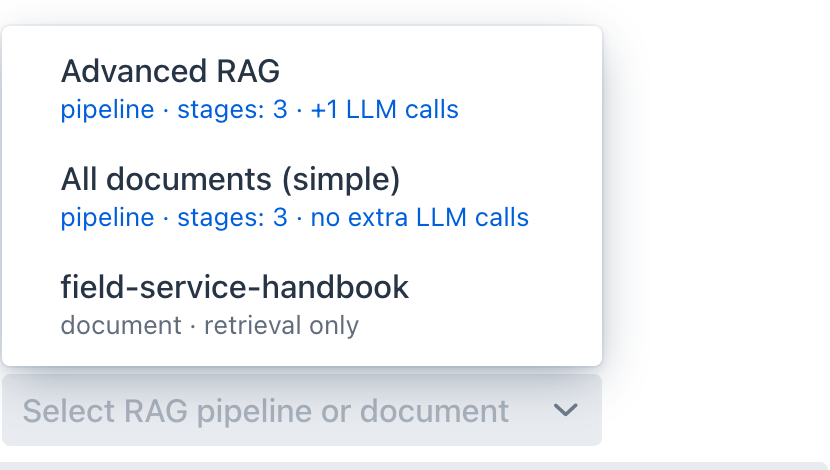
- A pipeline row shows
pipeline · stages: N · +M LLM calls, so the cost of the configuration is visible before you send anything.stagescounts everything the pipeline will run, including the retrieval and augmentation steps that are always present, while the second half counts only the query-transformation stages that each add a model call. A pipeline with none of those readsno extra LLM calls. - A document row shows
document · retrieval only, meaning no query transformation runs and the question reaches the vector store exactly as you typed it.
Choosing a document is not a separate code path. The advisor synthesizes a pipeline scoped to that document and runs the same executor, so the two kinds of source differ in configuration rather than in machinery. That synthesized pipeline still performs the local stages, so its trace reads Retrieve → Re-rank → Augment, and it inherits the global Top-K and similarity threshold rather than carrying its own.
Leaving the selector empty skips retrieval entirely. The selection is remembered per conversation, so reopening a chat restores its RAG source along with its tools and model.
Reading the trace
When a turn retrieves, a RAG panel appears above the answer with the stages that ran.
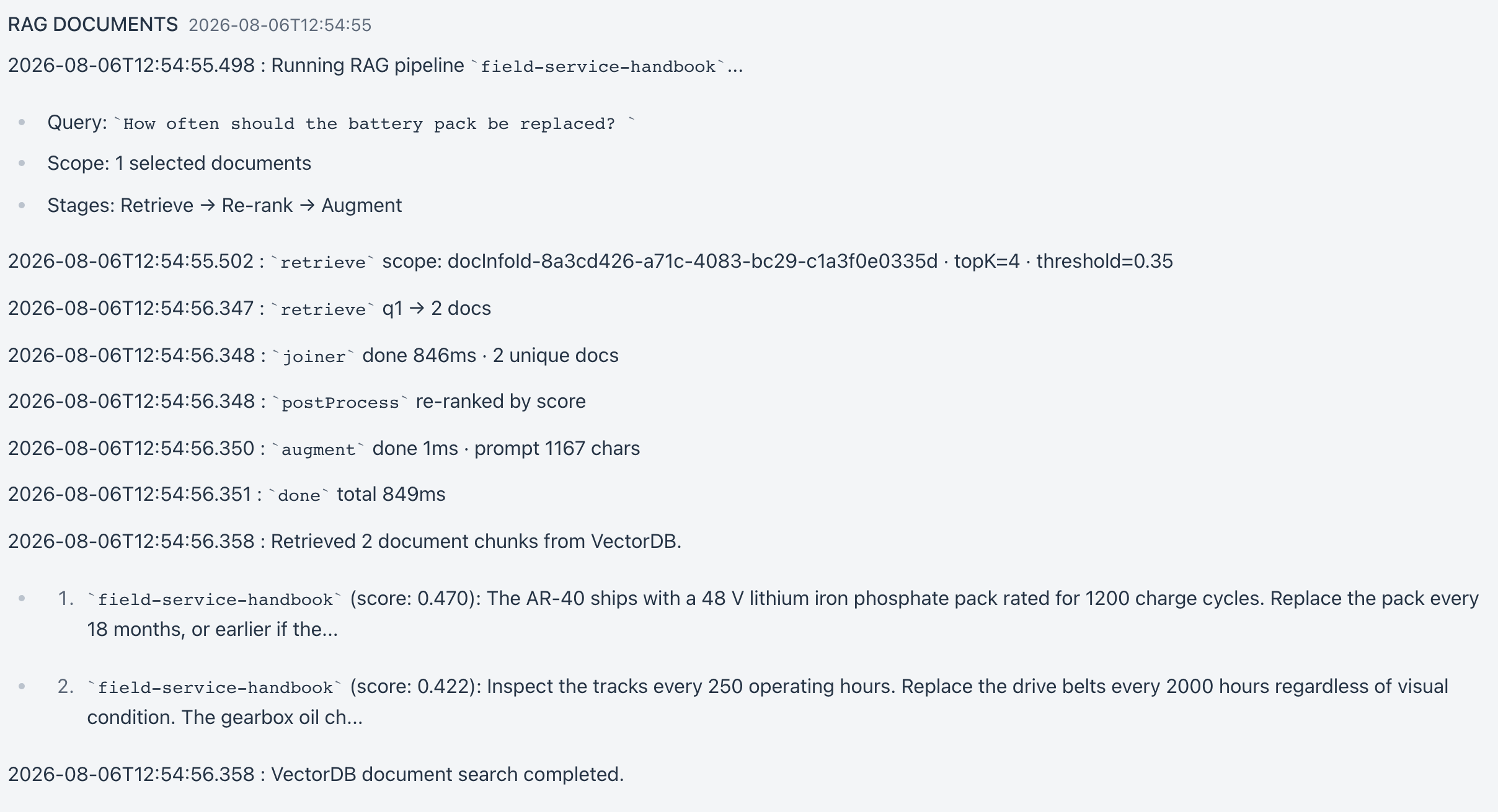
The panel is where a staged pipeline stops being abstract: you see the rewritten query, the expanded variants, and the documents that survived post-processing, in the order they happened. When an answer is not grounded, this tells you whether retrieval failed or generation ignored what it was given.
If the panel reports zero documents, the pipeline's similarity threshold is the first thing to check. An authored pipeline whose Allow empty context stays off replies that the question is outside its knowledge base rather than answering; a document picked straight from the chat selector allows empty context, so it answers from the model's own knowledge and only the empty panel tells you retrieval found nothing. Scores depend on the embedding model, so a threshold carried over from a different model can sit above everything your corpus actually scores; see Pipeline Studio → Retrieval for the measured ranges.
How it runs
SpringAiPlaygroundRagAdvisor sits in the chat advisor chain and short-circuits when no RAG source is selected. When one is selected it resolves the source, then calls the same RagPipelineExecutor used by Pipeline Studio.
Two details are worth knowing:
- Generation stays with the chat model. The executor runs every stage up to and including the augmenter, then hands the assembled prompt back rather than calling a model itself, so the answer streams from the chat model you selected. A pipeline's Run LLM after augment option is therefore ignored in chat; it exists for testing in the Studio.
- Compression gets real history. Prior user and assistant turns are passed into the query so
CompressionQueryTransformercan fold a follow-up into a standalone question. This is what makes a staged pipeline behave differently in a conversation than in a one-shot test.
Retrieved documents are carried on the request so the panel and the answer render from the same set.
Timeouts with local models
Each stage is a separate model call, so a four-stage pipeline on a local model can take minutes before the first token appears. Two limits apply:
spring.http.clients.read-timeout(default10m) bounds each individual HTTP call to the model, including embedding calls and every pre-retrieval stage. See Configuration.- The first-signal watchdog is derived from that value multiplied by the number of LLM pre-retrieval stages plus one (for the answer itself), with a five-minute floor and a one-hour cap, so enabling more LLM stages widens the budget automatically instead of tripping a fixed limit. A plain document source adds no extra stages.
If a turn dies waiting, the +N LLM calls figure in the pipeline hint is the first thing to check against your model's speed.
Next
- Tutorial 5 - Chat with RAG - a document first, then the same question through a staged pipeline
- Agentic Chat - the rest of the chat surface