MCP Inspector
Where: top navigation → MCP Server → select an active connection → the MCP Inspector pane.
The MCP Inspector is the right-hand pane of the MCP Server screen for an active connection. It exposes every primitive the connected server speaks - and every client primitive the server can call back into - as a per-card surface you can drive in isolation from chat.
There are eight primitives in the Model Context Protocol specification that this Inspector covers, split by direction:
| Direction | Primitives |
|---|---|
| Server → client (Inspector calls the server) | Tools · Resources · Prompts · Ping · Notifications |
| Server → client (inverted) - the server asks the playground's MCP client to do something | Roots · Sampling · Elicitation |
Spring AI's MCP support exposes both sides through spring-ai-starter-mcp-client (which the playground uses to talk to every active connection) and spring-ai-starter-mcp-server (which the playground itself implements as the built-in MCP server). The Inspector is a thin Vaadin Flow surface around the client half - it consumes server primitives, and it answers the inverted ones.
Want to see every primitive light up at once?
Activate the MCP Everything catalog row - it's the official MCP working group's reference test server, and it intentionally implements every primitive listed below. See Default MCP Servers → Examples → MCP-Everything for the activation spec, per-OS command, Docker alternative, and a one-tool-per-tab walkthrough.
Server primitives
Tools
What it is - In the MCP spec, a tool is a callable function the server publishes. Each tool has a stable name, an optional human-readable displayTitle, a model-facing description, an input schema (JSON Schema), an optional output schema, and a set of declarative annotations (readOnlyHint, destructiveHint, idempotentHint, openWorldHint). The client discovers the set with tools/list and invokes one with tools/call. Spring AI's McpSyncClient (or McpAsyncClient) is the Java entry point; the playground holds one per active connection inside McpClientService.
How the playground surfaces it - webui/mcp/inspector/primitives/server/ToolPrimitive.java renders each tool the server returns from tools/list as a full-width card. The card lays out the Run action button, the display title (with the raw tool.name as a sub-label when displayTitle differs), a risk chip scoring the tool on the MCP risk rubric (L0-L5, e.g. L2 - Low; a built-in tool gated by human-in-the-loop approval shows a dual chip like L5 → L4 - inherent level, then the effective level once the mandatory approval is credited), badges for every annotation the server declared, the model-facing description, and an inputs panel built per the tool's JSON-Schema property map - InspectorHelpers picks the right Vaadin control per JSON-Schema type (boolean → checkbox, number → number field, array/object → JSON editor, enum → dropdown, string → text field with format-aware placeholder). Clicking Run calls McpClientService.callTool(serverInfo, name, args) through the live transport - not a sandbox - and the result lands inline via InlineResultPanel (OK / ERROR badge · elapsed ms · ISO timestamp · REQUEST / RESPONSE blocks · Raw toggle to the JSON-RPC envelope · Copy · dismiss).
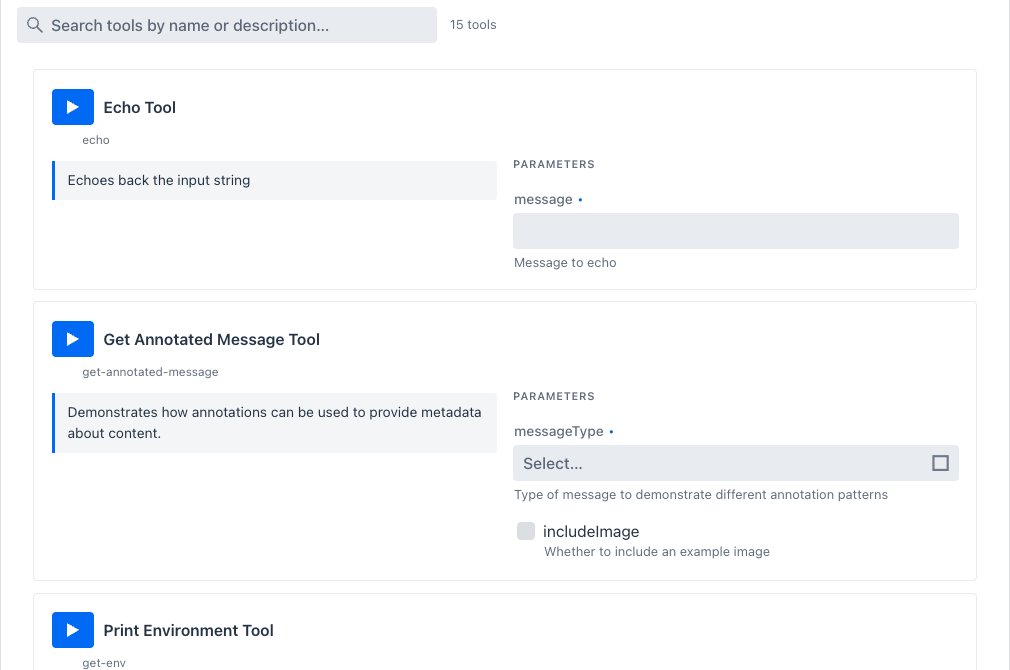
Tools tab - Echo card on top (message input) and Get Annotated Message just below (Select for messageType, checkbox for includeImage). Each card is ToolPrimitive rendering one entry from tools/list. The full per-tool walkthrough lives on the MCP Everything page.
Every card also carries its own risk chip next to the tool name. On the DeepWiki connection, both read tools score L2 - Low:
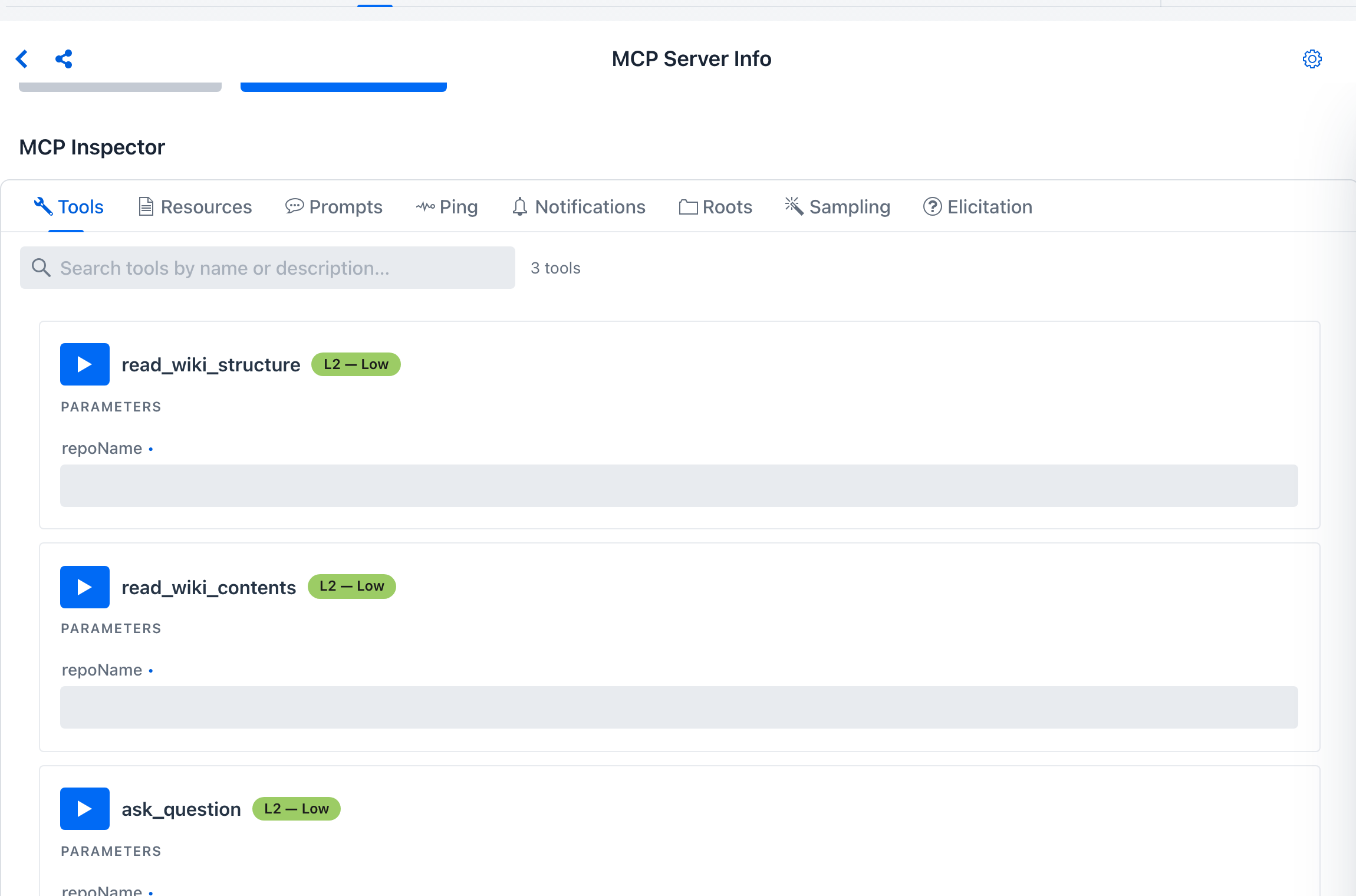
The per-tool chip is the MCP tool risk level, scored independently of the server. The same upstream tool re-exposed on the built-in server shows L0 - Verified instead, since the built-in self-loopback server bypasses the risk model.
Resources
What it is - A resource is content the server lets the client read by URI. The spec has two flavors: static resources are concrete URIs the server has (server.example/file.txt), discovered via resources/list; resource templates are URI patterns with parameters (server.example/file/{id}), discovered via resources/templates/list. Both are read with resources/read (uri + optional parameter substitution). Resources can carry a mimeType and a server-supplied description. Spring AI exposes resources on both sides - McpServerFeatures.SyncResourceSpecification for publishing, McpSyncClient.listResources / readResource for consuming.
How the playground surfaces it - ResourcePrimitive.java renders one card per static resource; ResourceTemplatePrimitive.java renders one card per template and includes the JSON-Schema-typed input panel for template variables. A Read play-button on each card calls resources/read for the resolved URI and lands the body inline. Text content types render verbatim; binary content surfaces as a base64 preview with byte-length displayed. The section header carries the count (RESOURCES N, RESOURCE TEMPLATES N).
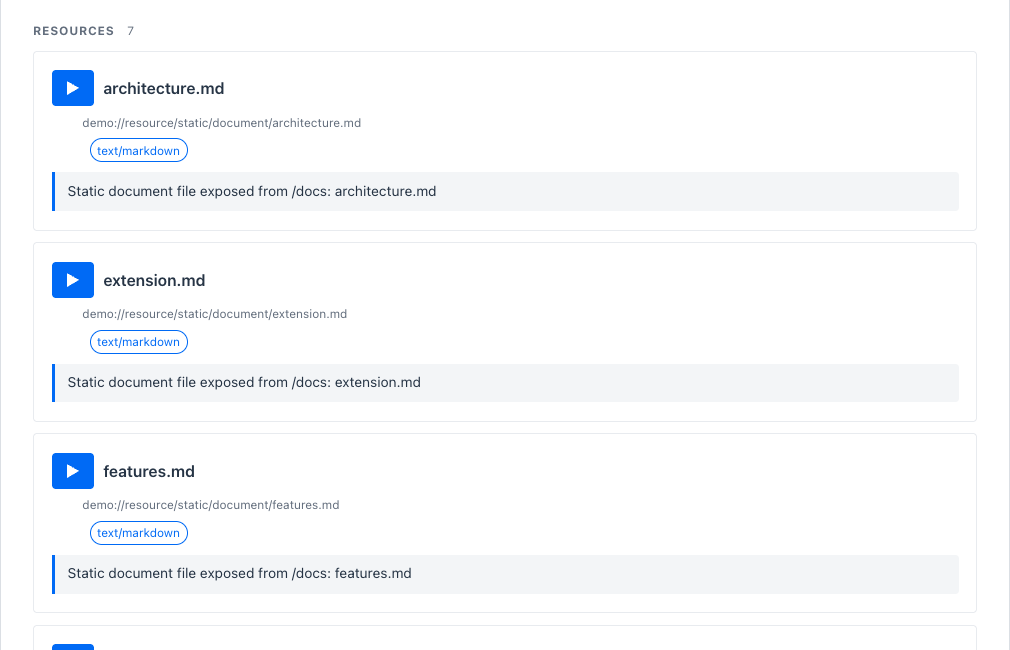
Resources tab - each row is one ResourcePrimitive card: name + URI + content-type chip + server-supplied description + a play-button to read. Resource templates (when the server publishes any) appear in a second section below the static list with a VARIABLES block per card driven by the same JSON-Schema input controls the Tools tab uses.
Prompts
What it is - A prompt is a named, parameterised message template the server can render for the client. The spec defines prompts/list (discovery, returns name + optional description + optional argument schema) and prompts/get (render with supplied arguments → returns a list of messages ready to feed a model). Argument schemas can flag completion support, which causes the client to call completion/complete for auto-suggest as the user types. Spring AI's McpSyncClient.listPrompts / getPrompt covers the consumer side.
How the playground surfaces it - PromptPrimitive.java renders one card per prompt. Argument-less prompts collapse to name + description + Get prompt. Prompts with arguments expose typed inputs per the prompt's argument schema; arguments declared as completable trigger MCP completion/complete calls as you type. Clicking Get prompt calls prompts/get and lands the rendered messages inline so you can see exactly what the server would hand a downstream model.
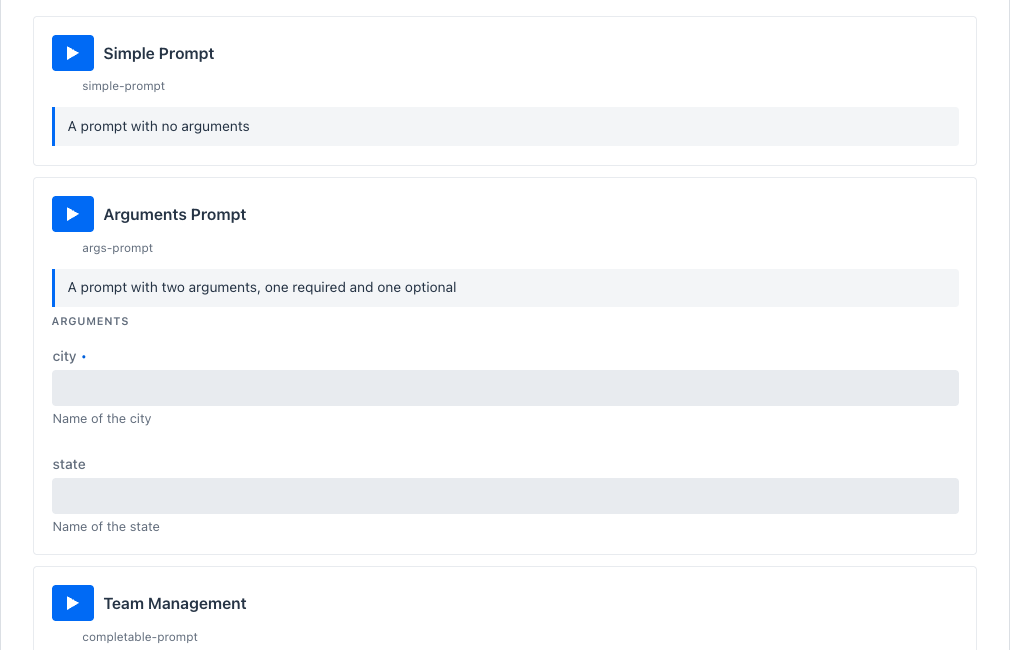
Prompts tab - Simple Prompt is an args-less prompt; Arguments Prompt requires city and accepts an optional state. A third card (completable-prompt / Team Management) lives further down and uses MCP completion for its department argument.
Ping
What it is - ping is a one-shot liveness check defined by the spec. The client sends an empty ping request; the server is expected to respond with an empty result. The round-trip is what proves the transport is alive end-to-end, independent of any tool or resource call. Spring AI's McpSyncClient.ping() issues it.
How the playground surfaces it - PingTab.java renders a single PingCard - one button, one inline result panel. Clicking the button sends ping and the result panel below shows the OK badge + elapsed milliseconds, or an ERROR badge if the transport returns or times out.
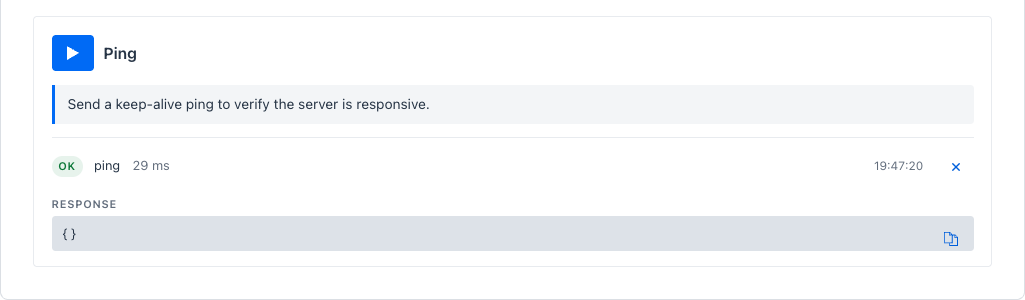
Use this for two things: a liveness check independent of any tool (a tool-call timeout doesn't say whether the server itself is reachable; ping does), and as a reconnect signal when the sidebar status dot flips gray.
Notifications
What it is - Notifications are unsolicited messages from the server to the client. The spec covers notifications/tools/list_changed, notifications/resources/list_changed, notifications/resources/updated, notifications/prompts/list_changed, and structured log records (notifications/message). Clients subscribe by being connected - the transport keeps the channel alive for inbound traffic. Spring AI dispatches them via McpSyncClient.setLoggingConsumer / setToolsChangeConsumer / setResourcesChangeConsumer / setPromptsChangeConsumer.
How the playground surfaces it - NotificationsTab.java is a live feed. Each incoming notification appears as a row with a timestamp, the notification method, and the (pretty-printed) payload. The feed accumulates while the tab is open and resets when the sidebar selection changes. This is the only place chat doesn't surface server push notifications, so it's the canonical way to verify that an external server actually emits the change events it claims to.
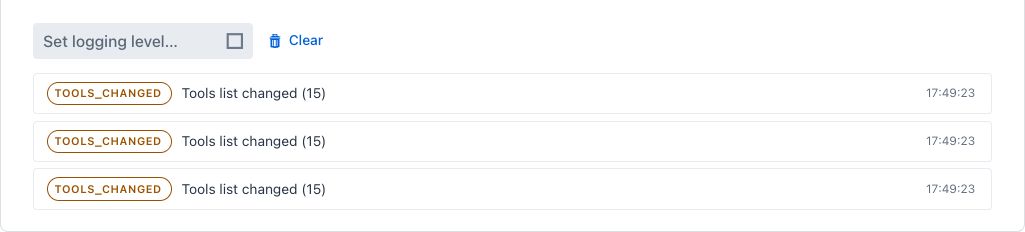
On MCP Everything specifically, invoking the Toggle Subscriber Updates tool on the Tools tab kicks the server into periodically pushing notifications/resources/updated - which is when entries start landing in this feed.
Client primitives
These three are inverted: the server initiates the call and the playground (acting as the MCP client) is expected to respond. Spring AI handles the wiring through McpClientFeatures - SyncRootsProvider, SyncSamplingProvider, SyncElicitationProvider. The playground binds a Vaadin tab to each provider so the human in the loop can answer.
Roots
What it is - A root is a file or URI the client advertises to the server as something the server may operate on. The server requests the list via roots/list; the client responds with its current roots. The client can also push notifications/roots/list_changed when the set mutates. The spec is intentionally non-prescriptive about how roots are scoped - it's a contract surface the server can rely on for filesystem-style operations without the client having to grant blanket access.
How the playground surfaces it - RootsTab.java lists the roots the playground will return to any roots/list request from the connected server. Each row is a RootPrimitive (URI + optional human-readable name + a remove button). An inline form at the bottom (URI + Name + + Add Root) appends a row and synchronises a notifications/roots/list_changed to the server.
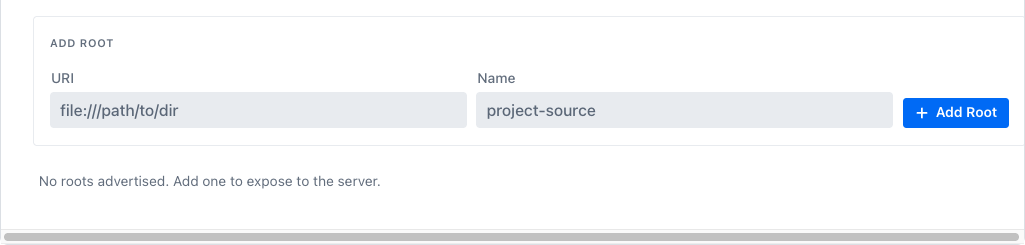
The default root list is empty - add roots only when a server has explicitly asked which directories or URIs you've opted to expose. Roots advertised here are visible to any subsequent roots/list from the connected server until you remove them.
Sampling
What it is - Sampling is the server asking the client to run a model turn on its behalf. The spec endpoint is sampling/createMessage - the server sends a conversation (messages), optional modelPreferences (cost / speed / intelligence hints), a system prompt, max tokens, temperature, and stop sequences; the client returns the assistant message. This is how a server-side agent loop can recurse into the user's model without bringing its own credentials. Spring AI's SyncSamplingProvider is the contract.
How the playground surfaces it - SamplingTab.java is a feed of pending sampling requests. Each request lands as a SamplingRequestPrimitive card carrying the conversation messages, the model preferences, and Send / Decline buttons. Sending runs the request through the playground's configured chat model (the same ChatClient Agentic Chat uses) and the resulting assistant message is returned to the server. Declining returns an MCP-spec error so the server can react.

Sampling is the human-in-the-loop gate you stand up before letting a server-side agent loop call back into the user's model. On MCP Everything, invoking the Trigger Sampling Request Tool on the Tools tab makes the server fire sampling/createMessage back here - that's when a card appears in this feed.
Elicitation
What it is - Elicitation is the server asking the user a question mid-conversation. The spec endpoint is elicitation/create - the server sends a prompt text plus a requestedSchema (a JSON Schema describing what answer it expects); the client renders the form, the human fills it in, the client returns the answer. This is how a server can pull "which calendar should I write this event to?" out of the user without the host model having to know to ask. Spring AI's SyncElicitationProvider is the contract.
How the playground surfaces it - ElicitationTab.java is a feed of pending elicitation requests. Each request lands as an ElicitationRequestPrimitive card carrying the prompt text, a form rendered per the server's requestedSchema (same JSON-Schema-typed inputs the Tools tab uses), and Accept / Decline / Cancel buttons. Accepting ships the answer back; declining or cancelling returns an error. The card stays in the feed afterwards as a record so you can audit what was asked.

On MCP Everything, invoking the Trigger Elicitation Request Tool on the Tools tab makes the server fire elicitation/create back here.
Why every Inspector card uses the same layout
Every per-primitive card - ToolPrimitive, ResourcePrimitive, PromptPrimitive, PingCard, SamplingRequestPrimitive, ElicitationRequestPrimitive, RootPrimitive - applies PrimitiveCardLayout.applyCardStyle and uses PrimitiveCardLayout.titleRow for the icon + title + action-button header. Result panels are all InlineResultPanel. That consistency is intentional - once you understand how one card behaves, every other tab works the same way: title row → optional badges → description → typed inputs → action → inline result. The eight tabs differ only in which primitive they exercise.
Hands-on walkthrough against a server that implements all eight primitives: Default MCP Servers → Examples → MCP-Everything.